Our Short List of 3

- Best for: Students who want a simple, light-work laptop for essays, reading, and online classes.
- Display: 15.6-inch Full HD display, 1920 x 1080 pixels
- Processor: Intel Celeron N4500, dual core, up to 2.8 GHz
- Memory: 8GB DDR4 RAM
- Storage: 128GB PCIe NVMe solid state drive plus 128GB eMMC

- Best for: Students who research with many tabs open and want a touchscreen plus generous storage.
- Display: 15.6-inch touchscreen laptop, LCD
- Processor: Intel Core i3-1315U, 6 cores, 8 threads, up to 4.5 GHz, Intel UHD Graphics
- Memory: 16GB DDR4 RAM
- Storage: 512GB NVMe solid state drive

- Best for: Students who want a touch display, fast storage, and a portable design for daily study.
- Display: 15.6-inch Full HD IPS touch display, 1080p
- Processor: AMD Ryzen 5 7520U
- Memory: 8GB LPDDR5 RAM
- Storage: 512GB PCIe solid state drive
All 5 Picks at a Glance
| Product | Specs | Action |
|---|---|---|
| Lenovo IdeaPad 1 |
| Check price on Amazon |
| HP 15 |
| Check price on Amazon |
| Acer Aspire 3 |
| Check price on Amazon |
 ASUS Vivobook Go 15 |
| Check price on Amazon |
 Dell Inspiron 15 |
| Check price on Amazon |
Key takeaways
- Compare five student laptops with fast solid state drive storage for classes, notes, and research, with SSD sizes, memory, and screens explained.
A student laptop lives a harder life than a desk machine. It gets carried between lectures, opened on library tables, and asked to run a dozen browser tabs while a document, a slide deck, and a video call all compete at once. The storage inside decides how much of that feels smooth and how much feels like waiting. A solid state drive wakes the machine quickly, opens large files without a long pause, and keeps the system responsive when several class tools run together.
This guide is for students who need a dependable machine for essays, research, spreadsheets, presentations, and online classes, and for parents helping a student choose one. The five laptops below were chosen from the names and specifications shown on their Amazon product pages, with attention to SSD capacity, memory, display type, processor, and operating system. Each one suits a slightly different kind of coursework.
Quick Picks
As an Amazon Associate we earn from qualifying purchases
| Product | Best for | Key spec from title |
|---|---|---|
| Lenovo IdeaPad 1 | Light classwork and essay writing on a simple setup | 128GB SSD plus 128GB eMMC, 8GB RAM, 15.6-inch FHD display |
| HP 15 | Touchscreen note-taking with roomy storage | 512GB SSD, 16GB RAM, Intel Core i3-1315U, 15.6-inch touchscreen |
| Acer Aspire 3 | Everyday study with a touch display and fast storage | 512GB SSD, 8GB LPDDR5 RAM, AMD Ryzen 5 7520U, 15.6-inch Full HD IPS touch display |
| ASUS Vivobook Go 15 | Carrying between classes in a slim, durable frame | 256GB SSD, 8GB DDR5 RAM, AMD Ryzen 3 7320U, 15.6-inch FHD display |
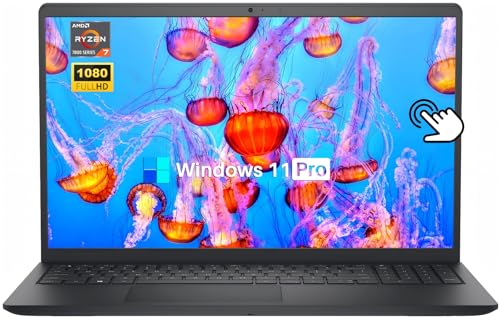
| Dell Inspiron 15 | Heavier multitasking and long research sessions | 512GB SSD, 16GB RAM, AMD Ryzen 7 7730U, 15.6-inch FHD touchscreen |
How to Choose
Match the SSD size to the work, not the wishlist
A 128GB solid state drive can carry an operating system, a browser, office software, and a term of documents, yet it fills up quickly once lecture recordings, photo collections, and large project files join the pile. A student who works mainly in cloud documents and streams most media can live comfortably with that size, provided finished work is moved elsewhere. A 256GB drive gives more breathing room for a second year of coursework and a modest media library. A 512GB drive suits students who keep video projects, design files, or downloaded course material on the machine itself.
Treat memory as the multitasking budget
Memory decides how many things stay open without the machine slowing down. Eight gigabytes handles a browser with several tabs, a word processor, and a video call together, which covers most lecture and essay days. Sixteen gigabytes gives a wider margin for research sessions where a student jumps between sources, a spreadsheet, a citation tool, and a presentation, and it helps when a course adds heavier software later in the year. Many student laptops do not invite easy upgrades, so the amount fitted at purchase often stays for the whole degree.
Weigh the screen against the bag it travels in
A 15.6-inch display makes split-screen research comfortable, because a source can sit beside the notes without constant switching, and a full-size keyboard with a numeric keypad helps with data entry and long typing sessions. The trade is size and weight, since a larger machine takes up more room in a bag and on a crowded lecture desk. A touchscreen adds a direct way to scroll through readings, tap through slides, and annotate material. Glare matters too, because a glossy screen can fight with bright classroom lighting, while an anti-glare finish keeps text readable in more rooms.
Check the ports, wireless, and software before buying
A laptop that cannot connect to the things a student already owns becomes a daily frustration. Look for enough USB ports for a mouse, a flash drive, and a phone cable, plus an HDMI port for a shared screen in a group room and a headphone jack for the library. Wi-Fi 6 keeps connections steadier on crowded campus networks, and Bluetooth links wireless headphones and a mouse without a dongle. The operating system matters as well, because Windows 11 Home covers most student software, while Windows 11 Pro adds features that business and technical courses sometimes expect.
The 5 Best Options
Lenovo IdeaPad 1
- Best for: Students who want a simple, light-work laptop for essays, reading, and online classes.
- Display: 15.6-inch Full HD display, 1920 x 1080 pixels
- Processor: Intel Celeron N4500, dual core, up to 2.8 GHz
- Memory: 8GB DDR4 RAM
- Storage: 128GB PCIe NVMe solid state drive plus 128GB eMMC
Students who want a simple, light-work laptop for essays, reading, and online classes.
The 128GB solid state drive fills up fast, so plan where large files and finished projects will live.
The Lenovo IdeaPad 1 suits a student who wants a straightforward machine for writing, reading, and online classes without a complicated setup. Its 15.6-inch Full HD display gives essays and research pages room to breathe, while the dual-core processor and 8GB of memory handle the everyday rhythm of lectures, browser research, and document editing. The combination of a 128GB solid state drive and 128GB of eMMC storage keeps the system responsive for booting and opening files, though it asks the owner to stay organised about what stays on the machine.
HP 15
- Best for: Students who research with many tabs open and want a touchscreen plus generous storage.
- Display: 15.6-inch touchscreen laptop, LCD
- Processor: Intel Core i3-1315U, 6 cores, 8 threads, up to 4.5 GHz, Intel UHD Graphics
- Memory: 16GB DDR4 RAM
- Storage: 512GB NVMe solid state drive
Students who research with many tabs open and want a touchscreen plus generous storage.
Confirm the exact display resolution and the portable drive contents on the listing before buying, since bundles can change.
The HP 15 is built around a comfortable margin of memory and storage, which makes it a strong fit for students who keep many tabs and documents open during research. Its Intel Core i3-1315U processor carries six cores and reaches up to 4.5 GHz, and the 16GB of DDR4 memory supports the jump between a browser, a spreadsheet, and a slide deck without forcing the student to close work to open something else. The 512GB NVMe solid state drive holds a full year of coursework with room to spare, and the touchscreen adds a natural way to scroll through notes and present from the machine.
Acer Aspire 3
- Best for: Students who want a touch display, fast storage, and a portable design for daily study.
- Display: 15.6-inch Full HD IPS touch display, 1080p
- Processor: AMD Ryzen 5 7520U
- Memory: 8GB LPDDR5 RAM
- Storage: 512GB PCIe solid state drive
Students who want a touch display, fast storage, and a portable design for daily study.
The 8GB of memory is fine for everyday study but leaves less headroom for very heavy multitasking.
The Acer Aspire 3 pairs a touch display with a capable AMD processor, giving students a machine that works well for reading, annotating, and switching between tasks. Its Ryzen 5 7520U processor drives the 15.6-inch Full HD IPS touch display, and the 512GB PCIe solid state drive opens applications and files quickly enough that waiting rarely interrupts a study session. Eight gigabytes of LPDDR5 memory keeps everyday multitasking smooth, while Wi-Fi 6 supports steady connections on shared networks. The Steam Blue finish and thin, light design make it easy to carry, and Windows 11 Home covers the software most courses expect, from office tools to video calls.
ASUS Vivobook Go 15
- Best for: Students who carry their laptop between classes and want a slim, durable machine.
- Display: 15.6-inch Full HD slim laptop display
- Processor: AMD Ryzen 3 7320U, quad core
- Memory: 8GB DDR5 RAM
- Storage: 256GB solid state drive
Students who carry their laptop between classes and want a slim, durable machine.
The 256GB drive needs occasional tidying if video projects and large downloads pile up.
The ASUS Vivobook Go 15 is the pick for a student who carries a laptop all day and wants it to survive the journey. Its slim frame, military grade durability claim, and fast charging support a routine of lectures, library sessions, and group work without constant worry about the machine itself. Inside, the AMD Ryzen 3 7320U quad-core processor and 8GB of DDR5 memory handle writing, research, and video calls, while the 256GB solid state drive gives more room than entry-level storage. A webcam shield adds privacy for shared rooms, and Windows 11 Home keeps the setup familiar.
Dell Inspiron 15
- Best for: Students with demanding coursework who need strong multitasking and large, fast storage.
- Display: 15.6-inch Full HD touchscreen laptop, LED-backlit display
- Processor: AMD Ryzen 7 7730U, 8 cores
- Memory: 16GB DDR4 RAM, 3200 MHz
- Storage: 512GB PCIe NVMe M.2 solid state drive
Students with demanding coursework who need strong multitasking and large, fast storage.
Check the exact ports and battery expectations for this configuration, since seller-upgraded listings can differ.
The Dell Inspiron 15 is the strongest performer in this group, aimed at students whose coursework asks for more than writing and browsing. Its AMD Ryzen 7 7730U processor has eight cores, and the 16GB of DDR4 memory running at 3200 MHz supports research sessions with many applications open at once, from data tools to design software. The 512GB PCIe NVMe M.2 solid state drive gives fast access to large files and plenty of space for projects, while the 15.6-inch Full HD touchscreen makes it easy to navigate documents and present work.
Which One Fits Your Situation
Starting university with a tight routine
A first-year student who mainly writes essays, reads course material, and joins online classes does not need the strongest machine in this group. The Lenovo IdeaPad 1 covers that routine with a clear Full HD display, enough memory for everyday work, and a solid state drive that keeps startup and file opening quick. Its smaller drive asks for good habits, like clearing finished downloads and keeping backups elsewhere.
Researching with many sources open at once
A student who builds essays from a dozen sources will feel the difference that memory and storage make. The HP 15 gives that student 16GB of memory and a 512GB solid state drive, so a browser full of tabs, a document, and a spreadsheet can stay open together. The touchscreen helps when scrolling through long readings or presenting findings to a group, and the included portable drive offers a ready backup habit for work that cannot be lost.
Studying on the move between lectures
A student who walks between buildings all day needs a machine that is easy to carry and quick to open. The ASUS Vivobook Go 15 fits that pattern with its slim frame, durable build, and fast charging, while the 256GB solid state drive holds a term of work without extra accessories. It handles the core student tasks well, and the webcam shield adds privacy in shared study spaces where the camera faces the room.
Handling demanding projects and presentations
A student on a technical, business, or media course often runs heavier software alongside research and presentation tools. The Dell Inspiron 15 meets that demand with an eight-core processor, 16GB of memory, and a 512GB solid state drive, so large files open quickly and several applications stay responsive together. Its touchscreen and Windows 11 Pro setup suit presenting and course software alike, making it the pick when the workload goes beyond essays and reading.
Common Mistakes
- Buying the smallest solid state drive available and then discovering that lecture recordings, project files, and software updates leave no room to work.
- Choosing a laptop for its processor alone while ignoring memory, since a fast chip still stalls when too many tabs and documents compete for limited RAM.
- Assuming every listing with the same model name has the same storage, memory, and display, when sellers often list several configurations under one family name.
- Forgetting to check ports and wireless support, then finding that a favourite mouse, flash drive, or classroom display cannot connect without an adapter.
- Skipping a backup plan, so a lost or damaged laptop takes a whole term of essays and notes with it.
Frequently Asked Questions
How much SSD storage does a student laptop need?
Most students manage well with 256GB, which holds the operating system, office software, a browser, and a year or more of documents. A 128GB drive works when most work lives in cloud documents and files are moved off the machine regularly. Students who keep video projects, design files, or large downloaded course packs on the laptop should aim for 512GB.
Is 8GB of RAM enough for student work?
Eight gigabytes covers essays, research, spreadsheets, presentations, and video calls, which make up most student days. It becomes tight when many browser tabs, a citation manager, and a large spreadsheet stay open together, or when a course adds heavier software. Sixteen gigabytes gives a wider margin for those sessions and helps the laptop stay useful for longer.
Does a touchscreen help for studying?
A touchscreen helps students who annotate readings, scroll through long documents, and present from the laptop, because tapping and swiping feel quicker than steering a cursor through the same material. It is less important for students who mainly type essays and work with a mouse, where a standard display does the same job.
Should a student choose Windows 11 Home or Windows 11 Pro?
Windows 11 Home covers the software most students use, including office tools, browsers, video calls, and course platforms. Windows 11 Pro adds management and security features that some business and technical courses expect, and it suits students who connect to institutional systems with stricter requirements. Unless a course specifically asks for Pro, Home is enough.