Key takeaways
- Find the best sd cards for canon eos m50 with UHS-I speed, V30 video ratings and room for 4K clips, from 128GB picks to a roomy 256GB card for long trips.
The Canon EOS M50 is a small mirrorless camera that asks a lot from a single memory card. It records 4K video, shoots 24.1-megapixel stills, and fires bursts at up to 10 frames per second, and all of that data lands on one SD card in the camera’s single slot. A slow or undersized card can cut a 4K clip short, stall a burst while the buffer clears, or simply fill up halfway through a day of shooting. The right card keeps the camera responsive and gives your footage room to breathe.
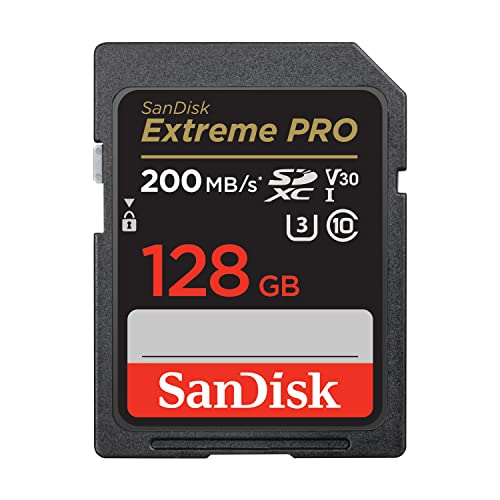

This guide is for EOS M50 and EOS M50 Mark II owners who shoot a mix of stills and video and want a card that matches what the camera can actually use. The M50 has a UHS-I card slot, so every pick below is judged on how it performs on a UHS-I bus, not on headline speeds that only a faster interface can reach. The four cards were chosen from their Amazon listing names and stated specifications, covering two capacities, three brands, and one forward-looking UHS-II option for readers who also use faster gear.
Quick Picks
Our Short List of 3
- Best for: Everyday M50 shooting, 4K and Full HD video, and bursts, in one dependable card.
- Brand: SanDisk
- Model Number: SDSDXXD-128G-GN4IN
- Capacity: 128GB SDXC
- Bus interface: UHS-I
- Best for: Long recording days, events, and travel where swapping cards is impractical.
- Brand: SanDisk
- Model Number: SDSDXXD-256G-GN4IN
- Capacity: 256GB SDXC
- Bus interface: UHS-I

- Best for: A second card, a bag spare, or buyers who prefer the Kingston Canvas line.
- Brand: Kingston
- Model Number: SDG4/128GB
- Capacity: 128GB SDXC, full-size SD format
- Bus interface: UHS-I
All 4 Picks at a Glance
| Product | Specs | Action |
|---|---|---|
| SanDisk 128GB Extreme PRO SDXC UHS-I (SDSDXXD-128G-GN4IN) |
| Check price on Amazon |
| SanDisk 256GB Extreme PRO SDXC UHS-I (SDSDXXD-256G-GN4IN) |
| Check price on Amazon |
| Kingston Canvas Go! Plus 128GB SD (SDG4/128GB) |
| Check price on Amazon |
 Lexar Professional 1667x 128GB SDXC UHS-II (LSD128CBNA1667) |
| Check price on Amazon |
How to Choose
Match the card to the M50’s UHS-I slot
The single most important fact about buying a card for this camera is that the EOS M50’s slot speaks UHS-I. A UHS-I card runs at its full rated speed in the camera, while a UHS-II card drops back to UHS-I speeds because the M50 lacks the second row of contacts the faster bus needs. That does not make UHS-II cards useless — they still work, and they transfer files faster in a UHS-II reader — but you should never pay a premium expecting the camera itself to shoot faster with one. For pure in-camera performance, a good UHS-I card is the ceiling.
Check the video speed class, not just the read speed
Read speed is the number printed largest on the card, but it mostly governs how quickly you can copy files to a computer. What keeps 4K and Full HD recording running without dropped frames is the sustained write speed, expressed through the speed classes. Look for Class 10 with the U3 mark and a V30 video speed class rating: V30 guarantees a minimum sustained write speed that comfortably covers the M50’s video bitrates, including its 4K mode. All four cards in this guide carry U3 and at least V30, and the Lexar steps up to V60 for more demanding cameras.
Pick a capacity that fits how you shoot
Capacity decides how often you have to stop and swap. A 128GB card holds thousands of JPEG stills and a generous amount of 4K footage, which suits everyday shooting, family events, and short trips. If you record long interviews, events, or travel days where offloading to a computer is not practical, 256GB doubles that headroom in the same single slot. Because the M50 has only one slot, there is no in-camera backup, so many owners prefer two 128GB cards rotated through the day rather than one very large card holding everything.
Buy the right physical format and a name you can verify
The EOS M50 takes full-size SD cards, so the card you buy should be a full-size SDXC card, not a microSD card in an adapter. Adapters add a failure point and can flex or lose contact in the slot. Stick to established memory brands, check that the model number on the listing matches the card family you intend to buy, and format any new card in the camera before its first real shoot so the file system matches what the M50 expects.
The 4 Best Options
SanDisk 128GB Extreme PRO SDXC UHS-I (SDSDXXD-128G-GN4IN)
- Best for: Everyday M50 shooting, 4K and Full HD video, and bursts, in one dependable card.
- Brand: SanDisk
- Model Number: SDSDXXD-128G-GN4IN
- Capacity: 128GB SDXC
- Bus interface: UHS-I
Everyday M50 shooting, 4K and Full HD video, and bursts, in one dependable card.
Only one card slot in the camera means no backup, so pair it with a spare if the shoot matters.
For most EOS M50 owners, this is the straightforward recommendation. The SanDisk Extreme PRO 128GB is a UHS-I card, which means it runs at its full rated performance in the M50’s slot, and its Class 10, U3, and V30 ratings cover everything the camera records, from 4K video to continuous stills bursts. With read speeds of up to 200 MB/s, it also empties quickly into a card reader at the end of the day.
The 128GB capacity is the sweet spot for this camera. It is large enough for a full day of mixed stills and video for most people, yet small enough that a lost or damaged card does not take an entire vacation’s worth of files with it. If you are buying your first card for the M50, or replacing an older, slower one, this is the card to start with.
Watch out for: Only one card slot in the camera means no backup, so pair it with a spare if the shoot matters.
SanDisk 256GB Extreme PRO SDXC UHS-I (SDSDXXD-256G-GN4IN)
- Best for: Long recording days, events, and travel where swapping cards is impractical.
- Brand: SanDisk
- Model Number: SDSDXXD-256G-GN4IN
- Capacity: 256GB SDXC
- Bus interface: UHS-I
Long recording days, events, and travel where swapping cards is impractical.
A single 256GB card concentrates your files; back up nightly rather than letting footage accumulate.
This is the same Extreme PRO UHS-I family as the pick above, doubled to 256GB. It carries the same Class 10, U3, and V30 ratings and the same up to 200 MB/s read speed, so in-camera behavior is identical; the difference is purely how much you can record before the card fills. For video-heavy work, that difference is the whole point.
Choose this capacity if you film long-form content such as weddings, services, interviews, or travel days where you cannot offload at midday. It is also a sensible single-card solution for a weekend trip with the M50 as your only camera. The trade-off of any large card applies here: more of your footage lives in one place, so a disciplined offload routine at the end of each day matters.
Watch out for: A single 256GB card concentrates your files; back up nightly rather than letting footage accumulate.
Kingston Canvas Go! Plus 128GB SD (SDG4/128GB)
- Best for: A second card, a bag spare, or buyers who prefer the Kingston Canvas line.
- Brand: Kingston
- Model Number: SDG4/128GB
- Capacity: 128GB SDXC, full-size SD format
- Bus interface: UHS-I
A second card, a bag spare, or buyers who prefer the Kingston Canvas line.
Confirm the listing is the full-size SD card and not a microSD variant before ordering.
Kingston’s Canvas Go! Plus gives M50 owners a genuine alternative brand at the same core specification: a full-size 128GB SDXC card on the UHS-I bus, with read speeds of up to 200 MB/s and Class 10, U3, and V30 ratings for 4K video. On paper it matches the SanDisk 128GB card point for point, which makes it an easy second card from a different maker.
That makes it useful in a couple of ways. It works as a main card if you prefer the Kingston line, and it is an equally good spare to keep in the camera bag so a full or faulty primary card never ends a shoot. Rotating between two cards from different production runs is also a simple hedge against a bad batch. Just note that this listing is for the full-size SD version, which is exactly what the M50 needs.
Watch out for: Confirm the listing is the full-size SD card and not a microSD variant before ordering.
Lexar Professional 1667x 128GB SDXC UHS-II (LSD128CBNA1667)
- Best for: Shooters who also own UHS-II cameras or a UHS-II reader and want one card for everything.
- Brand: Lexar
- Model Number: LSD128CBNA1667
- Capacity: 128GB SDXC
- Bus interface: UHS-II, backward compatible with UHS-I cameras such as the EOS M50
Shooters who also own UHS-II cameras or a UHS-II reader and want one card for everything.
The M50 cannot use the UHS-II bus, so do not buy it expecting faster shooting in this camera.
The Lexar Professional 1667x is the one card here that plays two roles. It is a UHS-II card, and in the EOS M50 it runs at UHS-I speeds like the other picks, because the camera’s slot is UHS-I. Inside the M50 it behaves as a fast, fully compatible 128GB card with headroom to spare, thanks to its U3 and V60 ratings.
Its real advantage shows up outside this camera. Paired with a UHS-II reader, it transfers files at up to 250 MB/s read, and in a UHS-II camera body it unlocks the faster bus and the higher V60 sustained write rating. If the M50 is your second body, or you expect to move to a higher-end Canon body later, this card travels with you instead of being left behind. If the M50 is and will remain your only camera, the UHS-I cards above give you the same in-camera experience.
Watch out for: The M50 cannot use the UHS-II bus, so do not buy it expecting faster shooting in this camera.
Which One Fits Your Situation
You mostly shoot stills with some short video clips
Take the SanDisk 128GB Extreme PRO. Its UHS-I interface and V30 rating cover bursts and occasional 4K clips with ease, and 128GB is ample when video is not the main event.
You film events or long sessions in 4K
Take the SanDisk 256GB Extreme PRO. Same speed ratings, twice the room, so a long ceremony, match, or interview does not hinge on a mid-shoot card swap.
You want a dependable spare in the bag
Take the Kingston Canvas Go! Plus 128GB. It matches the primary card’s specification, so whichever card is in the camera, the camera behaves the same way.
You shoot with other, faster cameras too
Take the Lexar Professional 1667x 128GB. It serves the M50 today at UHS-I speeds and still earns its keep in UHS-II bodies and readers tomorrow.
Common Mistakes
- Buying a UHS-II card expecting the EOS M50 to shoot faster; the camera’s slot is UHS-I, so the card runs at UHS-I speeds in the body.
- Judging a card by read speed alone and ignoring the U3 and V30 ratings that actually sustain 4K and Full HD recording.
- Using a microSD card in an adapter in the M50’s full-size slot, which adds a needless point of failure.
- Putting an entire trip on one very large card and never offloading, when the camera has a single slot and no backup.
- Skipping the in-camera format on a brand-new card, which can leave a file system the camera did not create.
Frequently Asked Questions
Does the Canon EOS M50 need a UHS-II card?
No. The EOS M50 has a UHS-I slot, so a UHS-I card runs at full speed in the camera. A UHS-II card such as the Lexar 1667x still works because it is backward compatible, but it operates at UHS-I speeds in the M50 and only shows its faster transfer speeds in a UHS-II reader or camera.
What speed class does the M50 need for 4K video?
A card rated Class 10 with U3 and V30 is the safe target. The V30 rating guarantees a minimum sustained write speed that covers the M50’s 4K and Full HD recording modes. Every card in this guide meets that bar, and the Lexar carries the higher V60 rating for more demanding cameras.
Is 128GB or 256GB better for the EOS M50?
It depends on how much video you record between offloads. For stills and short clips, 128GB is plenty and keeps less material at risk on one card. For long 4K sessions, events, or travel without a computer, 256GB gives you twice the headroom. Many owners carry two 128GB cards and rotate them.
Can I use a microSD card with an adapter in the EOS M50?
It may fit, but it is not recommended. The M50 is designed for full-size SD cards, and an adapter adds flex and contact points that can cause errors at the worst moment. All four cards in this guide are full-size SDXC cards that drop straight into the slot.
Related guides
- Best SD cards for other Canon EOS M and EOS R series cameras
- Best camera bags and card cases for mirrorless shooters
- Best USB-C and SD card readers for faster file transfers
As an Amazon Associate, we earn from qualifying purchases.