Our Short List of 3

- Best for: A home-office ATX build that should look like furniture and stay cool during long workdays.
- Genuine walnut wood front with mesh side panels
- Two 140mm Aspect PWM fans included
- Type-C USB on the front panel
- Fits ATX, mATX, and ITX motherboards
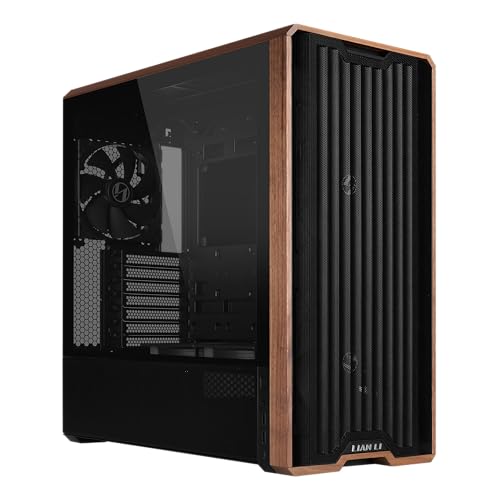
- Best for: A heavy work build that needs five fans and strong airflow from the first day, with no extra fans to buy.
- Genuine walnut wood computer case in a mid-tower ATX form
- Five pre-installed PWM fans: two 170mm, two 120mm, and one 140mm
- Flexible PSU and cable installation
- Model LAN217X

- Best for: A first ATX office or study build where simple assembly and tidy cables matter more than a silent sealed design.
- High-airflow mid-tower ATX case with a tempered glass side panel
- Two included 120 mm fans
- Cable management system with a spacious interior
- Motherboard compatibility: Extended ATX, ATX, Micro-ATX, and Mini-ITX
All 5 Picks at a Glance
| Product | Specs | Action |
|---|---|---|
| Fractal Design North Mesh Side Panels, Charcoal Black |
| Check price on Amazon |
| Lian Li LANCOOL 217, Black |
| Check price on Amazon |
| Corsair 4000D Airflow, Black |
| Check price on Amazon |
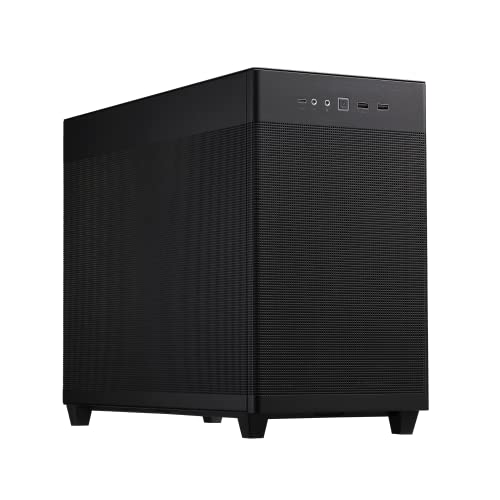 ASUS Prime AP201, Black Mesh |
| Check price on Amazon |
 Fractal Design Pop Air Black Solid |
| Check price on Amazon |
Key takeaways
- Five plain, quiet, non-gaming PC cases for office and home workstations, compared on size, airflow, noise control, and GPU and cooler clearance.
A non-gaming PC case is bought for a different reason than a gaming tower. The decision is not about showing off components through glass or filling a room with light. It is about a box that sits beside a desk all day, stays quiet during calls, moves enough air to keep a work machine cool, and does not look out of place in a home office or a shared workspace. The front panel, the fan layout, and the amount of open mesh matter more than any decorative feature.
This article is for office workers building a quiet desktop, home workers replacing a loud prebuilt tower, creators who need room for a long graphics card without a gaming look, and small-space builders who want a compact case that still fits standard parts. Every case below was chosen from the name and specifications stated on its Amazon product page, and every pick is a plain, non-RGB case suited to work rather than display.
Quick Picks
As an Amazon Associate we earn from qualifying purchases.
| Product | Best for | Key spec from title |
|---|---|---|
| Fractal Design North Mesh Side Panels, Charcoal Black | A living-room or home-office desk where the case should look like furniture | Genuine walnut wood front, mesh side panels, two 140mm Aspect PWM fans included |
| Lian Li LANCOOL 217, Black | A powerful work build that needs strong airflow straight out of the box | Five pre-installed PWM fans: two 170mm, two 120mm and one 140mm |
| Corsair 4000D Airflow, Black | A first ATX office build with simple cable routing and steady airflow | High-airflow mid-tower ATX case with two included 120mm fans |
| ASUS Prime AP201, Black Mesh | A small desk where a compact case must still take a long graphics card | 33-liter MicroATX case with support for 360mm coolers and graphics cards up to 338mm |
| Fractal Design Pop Air Black Solid | A closed, understated tower for a quiet room with no window into the build | Honeycomb mesh front, solid side panel, three 120mm Aspect 12 fans included |
How to Choose
Start with the motherboard and the desk
Measure the desk first, then match the case to the board. A mid-tower ATX case such as the Fractal Design North or the Corsair 4000D Airflow takes a full ATX board and leaves room for extra drives and a long graphics card, but it needs roughly 45 to 55 cm of depth on or beside a desk. A MicroATX case such as the ASUS Prime AP201 fits a smaller board in a 33-liter box, which suits a shallow desk or a shelf, yet it rules out a full ATX board entirely. Check the board size printed on the Amazon listing before ordering, because a case that is too small cannot be fixed with a different fan layout.
Decide between quiet panels and open mesh
A solid front and solid side panels block noise and hide cables, which helps in a room used for calls, recording, or shared work. The trade-off is heat: a closed case needs well-placed fans and clear intake paths, or warm air collects around the processor and graphics card. A mesh front and mesh side panels move air more freely and suit a machine that renders video, compiles code, or runs long workloads, but fan noise reaches the room more easily. If silence matters most, choose a solid-panel design and plan the fan curve; if sustained load matters most, choose mesh and accept a little more audible airflow.
Check graphics card and cooler clearance in millimetres
Clearance is the most common reason a non-gaming build goes wrong. A long graphics card for editing or 3D work can exceed 330 mm, and a tall air cooler can exceed 160 mm, so compare both figures with the numbers on the Amazon listing. The ASUS Prime AP201, for example, states graphics cards up to 338 mm long, while the Fractal Design North states graphics cards up to 355 mm, or 300 mm with a 360 mm front radiator fitted. Measure the card and the cooler, allow room for cables at the front, and confirm radiator support separately if a liquid cooler is planned, because front and top mounts often have different limits.
Count the fans that are actually included
A case with no included fans looks cheaper until the cost of three or four separate fans is added, and a case with five included fans can be the better value for a machine that runs all day. The Lian Li LANCOOL 217 includes five PWM fans, the Fractal Design Pop Air includes three 120 mm fans, and the Corsair 4000D Airflow includes two, so the cooling each case provides on arrival is very different. Standard 120 mm and 140 mm fans are easy to replace later, while an unusual size such as a 170 mm fan limits future choices. Check the front-panel connections too, especially for a USB Type-C port if the dock or external drive uses one.
The 5 Best Options
Fractal Design North Mesh Side Panels, Charcoal Black
- Best for: A home-office ATX build that should look like furniture and stay cool during long workdays.
- Genuine walnut wood front with mesh side panels
- Two 140mm Aspect PWM fans included
- Type-C USB on the front panel
- Fits ATX, mATX, and ITX motherboards
A home-office ATX build that should look like furniture and stay cool during long workdays.
Graphics card clearance drops to 300 mm when a 360 mm front radiator is fitted, so measure the card before choosing a front-mounted liquid cooler.
The Fractal Design North suits a home office where the computer is visible all day and should blend in with wooden furniture rather than announce itself as a gaming machine. Its walnut front slats and mesh side panels give it a calm, domestic look, while the open front and two large included fans keep air moving through a standard ATX work build. It is a good match for writers, designers, and home workers who want a full-size board, a long graphics card, and a case that looks deliberate on a desk.
Watch out for: Graphics card clearance drops to 300 mm when a 360 mm front radiator is fitted, so measure the card before choosing a front-mounted liquid cooler.
Lian Li LANCOOL 217, Black
- Best for: A heavy work build that needs five fans and strong airflow from the first day, with no extra fans to buy.
- Genuine walnut wood computer case in a mid-tower ATX form
- Five pre-installed PWM fans: two 170mm, two 120mm, and one 140mm
- Flexible PSU and cable installation
- Model LAN217X
A heavy work build that needs five fans and strong airflow from the first day, with no extra fans to buy.
The two 170 mm fans are an unusual size, so check replacement options before assuming a standard 120 mm or 140 mm fan will fit the same mounts.
The Lian Li LANCOOL 217 suits a powerful workstation that will run heavy tasks for hours, because it arrives with five pre-installed PWM fans and a mesh design that moves a large volume of air without extra purchases. The walnut wood trim keeps the front looking restrained for an office, and the flexible power supply and cable installation help keep the interior tidy when a large board and a long graphics card are fitted. It is best for video editing, 3D work, or compiling, where cooling headroom matters more than a silent, sealed box.
Watch out for: The two 170 mm fans are an unusual size, so check replacement options before assuming a standard 120 mm or 140 mm fan will fit the same mounts.
Corsair 4000D Airflow, Black
- Best for: A first ATX office or study build where simple assembly and tidy cables matter more than a silent sealed design.
- High-airflow mid-tower ATX case with a tempered glass side panel
- Two included 120 mm fans
- Cable management system with a spacious interior
- Motherboard compatibility: Extended ATX, ATX, Micro-ATX, and Mini-ITX
A first ATX office or study build where simple assembly and tidy cables matter more than a silent sealed design.
The side panel is tempered glass, so the interior stays visible; choose a solid-panel case instead if the build should be fully closed from view.
The Corsair 4000D Airflow is the straightforward choice for a first ATX office build, because its layout is simple, its cable management system keeps cables behind the tray, and its perforated front panel feeds cool air to the components without decorative lighting. It takes a wide range of boards, from Mini-ITX up to Extended ATX as listed on Amazon, and its two included 120 mm fans give a work machine a sensible starting point for cooling. It suits buyers who want a known, plain mid-tower and do not want to study fan curves or unusual mounts.
Watch out for: The side panel is tempered glass, so the interior stays visible; choose a solid-panel case instead if the build should be fully closed from view.
ASUS Prime AP201, Black Mesh
- Best for: A compact desk build that needs a long graphics card, a standard power supply, and a front USB Type-C port.
- 33-liter MicroATX case with tool-free side panels and quasi-filter mesh
- Support for 360 mm coolers, and for 280 mm and 360 mm radiators
- Graphics cards up to 338 mm long
- Standard ATX power supplies up to 180 mm long
A compact desk build that needs a long graphics card, a standard power supply, and a front USB Type-C port.
It takes MicroATX and Mini-ITX boards only, so a full ATX motherboard will not fit; confirm the board size before ordering.
The ASUS Prime AP201 suits a small desk where a full mid-tower would dominate the room, yet the build still needs a long graphics card and a standard ATX power supply. Its 33-liter box takes MicroATX boards, supports graphics cards up to 338 mm long, and accepts 280 mm and 360 mm radiators, which is generous for a compact case. Tool-free side panels with quasi-filter mesh make it easy to open for cleaning or a drive swap, and the front USB Type-C port is useful for modern docks and external drives.
Watch out for: It takes MicroATX and Mini-ITX boards only, so a full ATX motherboard will not fit; confirm the board size before ordering.
Fractal Design Pop Air Black Solid
- Best for: A quiet, fully closed ATX work build in a shared room, where no part of the interior should be on show.
- Honeycomb mesh front with a solid side panel
- Three 120 mm Aspect 12 fans included
- Accommodates ATX, mATX, and Mini ITX motherboards
- ATX high-airflow mid-tower form
A quiet, fully closed ATX work build in a shared room, where no part of the interior should be on show.
Fractal Design sells Pop Air variants with tempered glass and with RGB fans under very similar names, so confirm the listing states Black Solid before ordering.
The Fractal Design Pop Air Black Solid is the pick for a quiet room where the computer should disappear: no window, no lighting, and a solid side panel that hides the interior completely. Its honeycomb mesh front still lets air in, and the three included 120 mm fans give an ATX work build a solid cooling baseline without extra purchases. It suits a shared office, a bedroom desk, or a study where a plain black tower is preferable to a display case, and it leaves room for a standard ATX board and common work components.
Watch out for: Fractal Design sells Pop Air variants with tempered glass and with RGB fans under very similar names, so confirm the listing states Black Solid before ordering.
Which One Fits Your Situation
You want the case to look at home in a living room
Choose the Fractal Design North with mesh side panels. Its genuine walnut front and restrained shape read as furniture rather than computer hardware, which matters when the desk is in a shared living space. It still fits a full ATX board and a graphics card up to 355 mm, so the calm appearance does not force a small or underpowered build.
You run long, heavy workloads all day
Choose the Lian Li LANCOOL 217. Five pre-installed PWM fans and a mesh front give it the strongest out-of-the-box airflow in this article, which helps during video rendering, 3D work, or long compiles. The wood trim keeps it office-appropriate, and the flexible power supply mounting helps with a tidy interior around a large board.
You are building your first ATX office PC
Choose the Corsair 4000D Airflow. Its cable management system and spacious interior make a first build more forgiving, and two included 120 mm fans provide a sensible cooling baseline. The plain black finish and perforated front keep the result understated, while the wide board compatibility leaves room for a later motherboard change.
Your desk is small but your graphics card is long
Choose the ASUS Prime AP201 in black mesh. Its 33-liter case fits a graphics card up to 338 mm long and a standard ATX power supply, which is unusual for a box of this size. Tool-free mesh panels make access and cleaning simple, and the front USB Type-C port suits a modern desk setup with a dock or fast external drive.
Common Mistakes
- Buying a case for a full ATX board and then choosing a MicroATX-only case such as the ASUS Prime AP201, which cannot take the larger board.
- Choosing a solid, sealed case for a machine that renders or compiles for hours, then finding temperatures climb because intake airflow was never planned.
- Ordering a long graphics card without comparing its length with the case limit, especially when a front radiator reduces clearance, as it does on the Fractal Design North.
- Assuming every fan mount takes a standard 120 mm fan, when a case such as the Lian Li LANCOOL 217 uses 170 mm fans in part of its layout.
- Ordering a Pop Air by name alone and receiving a tempered glass or RGB variant, when the intended pick was the Black Solid version with a solid side panel.
Frequently Asked Questions
What makes a PC case non-gaming?
A non-gaming case is defined by its design priorities rather than by the parts inside it. It uses a plain front panel, mesh or solid panels instead of a display window, and fans without lighting, so the focus is on airflow, noise, and desk fit. The cases in this article were chosen for those traits, and each one can still hold a capable processor and graphics card for work.
Do I need a mesh front for office work?
Not always. A mesh front helps when the machine runs sustained heavy loads, because it lets cool air reach the processor and graphics card with less resistance. For writing, browsing, calls, and light editing, a solid-front case with well-placed fans is often quieter and perfectly adequate. Choose mesh for heat, and solid panels for silence.
How do I know if my graphics card will fit?
Compare the card length in millimetres with the maximum graphics card length stated on the Amazon product page for the case. Allow extra room if a front radiator is planned, because the radiator and its fans sit in the same space as the front of the card. Also check the card thickness and the number of slots it needs, since a thick card can block the slot below it.
Can a non-gaming case still cool a powerful work PC?
Yes, provided the case size, fan count, and clearance match the parts. A mesh case with several included fans, such as the Lian Li LANCOOL 217, handles sustained loads well, while a compact case needs careful fan placement and a cooler that fits its stated limits. The deciding factors are airflow path, fan count, and clearance, not whether the case carries a gaming label.