Our Short List of 3
All 3 Picks at a Glance
| Product | Specs | Action |
|---|---|---|
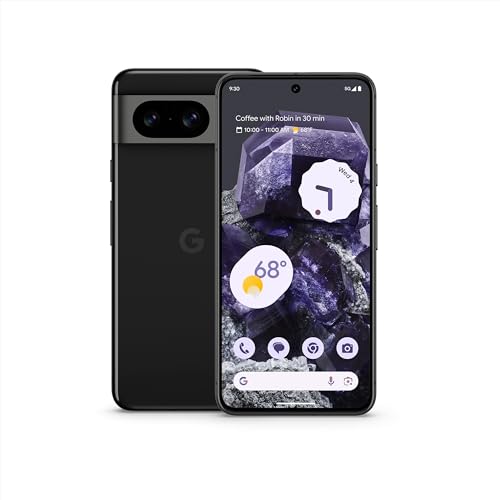 Google Pixel 8 | Check price on Amazon | |
 Google Pixel 8 Pro | Check price on Amazon | |
 Motorola Moto G Power 5G (2024) | Check price on Amazon |
Key takeaways
- Find the best unlocked Android phones for custom ROMs, from Pixel flagships to a budget Motorola pick, with unlockable bootloaders and strong ROM support.
Finding the best unlocked Android phones for custom ROMs is a different kind of phone shopping. Camera quality and battery life still matter, but the deciding questions are about freedom: can the bootloader be unlocked, does the manufacturer publish factory images, and does an active community maintain ROM builds for the exact model you buy? Get those answers wrong and you end up with a phone that stays locked down no matter how good its hardware looks.
This guide focuses on unlocked Android phones sold in the United States that combine an unlockable bootloader with real custom ROM support. Google Pixel phones lead the list for a reason. Google publishes factory images and full device trees, the bootloader unlock process is a documented fastboot command, and projects such as LineageOS, GrapheneOS, and CalyxOS maintain official builds for the Pixel 8 family. Motorola earns the final spot as a budget-friendly alternative with an official bootloader unlock program, though its ROM community is smaller and deserves an honest warning.
Every phone below is an unlocked Android model with a verified Amazon US listing. Availability was checked through cached Amazon search results and independent sources, since live Amazon product pages are currently unreachable, and no live in-stock claim is made here. Before you buy, confirm the exact model number and storage configuration on the listing, because a single letter can separate a flashable phone from a carrier-locked one.
At a Glance
| Product | Best For | Key Spec |
|---|---|---|
| Google Pixel 8 | Best all-round custom ROM phone | Tensor G3, 6.2-inch Actua OLED, 8GB RAM, 4,575mAh battery |
| Google Pixel 8 Pro | Most ROM choice and biggest screen | Tensor G3, 6.7-inch Super Actua LTPO display, 12GB RAM, 5,050mAh battery |
| Google Pixel 8a | Best value Pixel for flashing | Tensor G3, 6.1-inch Actua OLED, 8GB RAM, 4,492mAh battery |
| Motorola Moto G Power 5G (2024) | Budget entry point with unlockable bootloader | Dimensity 7020, 6.7-inch 120Hz display, 8GB RAM, 5,000mAh battery |
How to Choose an Unlocked Android Phone for Custom ROMs
1. Confirm the bootloader can be unlocked
A phone is only useful for custom ROMs if its bootloader can be unlocked. Google Pixel phones bought as factory-unlocked US models support unlocking through a standard fastboot command, and Google documents the process. Motorola runs an official bootloader unlock program for many of its phones. By contrast, most carrier-sold phones and many Samsung models sold in the United States ship with locked bootloaders that cannot be unlocked at all. Always buy the factory-unlocked US model, never a carrier-branded variant, and check the listing for the words factory unlocked rather than merely SIM unlocked. SIM unlocked only means the phone accepts another carrier, while factory unlocked is what keeps the bootloader path open.
2. Check for official ROM support by codename
Custom ROMs are built per device codename, not per brand. The Pixel 8 is shiba, the Pixel 8 Pro is husky, and the Pixel 8a is akita, and all three appear on the official LineageOS device list with current Android 17 based builds. That matters because an official build means a named maintainer, signed updates, and an install guide written for your exact hardware. Unofficial builds can be excellent, but they may stop without notice when a volunteer maintainer moves on. Before buying any phone for flashing, search the LineageOS device wiki and the XDA forums for its exact codename and confirm that a current build exists.
3. Prefer phones with factory images and A/B partitions
Google publishes complete factory images for Pixel phones, which gives you a reliable way back to stock software if a flash goes wrong. All four phones in this guide use A/B seamless update partitions, so a failed update can fall back to the previous working slot instead of leaving the phone unbootable. A phone without published factory images is much harder to recover.
4. Match the hardware to how long you plan to keep the phone
Custom ROMs extend a phone’s life, so buy hardware with headroom. More RAM helps a phone stay smooth through several Android generations, and a larger battery offsets the extra drain that some custom kernels and features can introduce. The Pixel 8 Pro’s 12GB of RAM and 5,050mAh battery give it the longest runway in this list, while the Pixel 8a trades some headroom for a lower budget. Storage matters too, because custom ROMs, gapps packages, and backups consume space, and none of the Pixel models in this guide accept a microSD card. If expandable storage is a priority, the Motorola is the only pick here with a card slot.
5. Understand the trade-offs before you unlock
Unlocking a bootloader erases everything on the phone, so back up first and unlock before you set the phone up. An unlocked bootloader also trips Google’s Play Integrity checks, which means some banking apps, payment apps, and games may refuse to run on a custom ROM. Check whether the apps you depend on tolerate unlocked devices before you commit. Finally, remember that unlocking may affect warranty coverage, so read the policy for your exact model.
6. Buy the right variant and verify the model number
Phone names are reused across years and regions, and the wrong variant can have different bands, a locked bootloader, or no ROM support. The Motorola Moto G Power 5G (2024) has the model number PB000008US for the Midnight Blue US version, and that number is the reliable way to separate it from earlier Moto G Power phones with nearly identical names. For Pixels, check that the listing says US model and factory unlocked, and match the storage and color to the listing you verified.
Product Reviews
Google Pixel 8
The Pixel 8 is the sweet spot of this list and the phone most custom ROM users should start with. It runs Google’s Tensor G3 chip with 8GB of LPDDR5X RAM and 128GB of UFS 3.1 storage in the configuration linked here, and its 6.2-inch Actua OLED display runs at up to 120Hz with a 2400 by 1080 resolution. The 4,575mAh battery supports 27W wired charging and wireless charging, and the phone carries an IP68 rating for dust and water resistance. The camera system pairs a 50MP main sensor with a 12MP ultrawide, plus a 10.5MP front camera.
For custom ROM use, the Pixel 8 is about as good as it gets. Its codename is shiba, and it appears on the official LineageOS device list with current Android 17 based builds, alongside support from GrapheneOS, CalyxOS, and other projects. Google publishes factory images for it, the bootloader unlock is a documented fastboot command, and the A/B partition layout makes recovery straightforward. Google also promises seven years of updates from launch.
The compact size is a genuine advantage for one-handed use, and the Tensor G3 handles everyday tasks and AI features smoothly. The main limitations are the 128GB storage ceiling in this configuration, with no microSD slot, and charging speeds that lag behind some rivals.
Pros:
– Official LineageOS support under codename shiba, plus GrapheneOS and CalyxOS builds
– Google factory images and a documented bootloader unlock process
– Compact 6.2-inch display with 120Hz refresh rate
– Seven years of OS and security updates promised from launch
– IP68 dust and water resistance
Cons:
– 128GB storage with no microSD expansion in this configuration
– 27W wired charging is slower than many rivals
– Tensor G3 can run warm under sustained heavy loads
Google Pixel 8 Pro
The Pixel 8 Pro is the most capable custom ROM phone in this guide and the pick for anyone who wants the largest screen, the most RAM, and the widest ROM selection. It uses the same Tensor G3 chip as the Pixel 8 but pairs it with 12GB of LPDDR5X RAM and a 6.7-inch Super Actua LTPO OLED display with a 2992 by 1344 resolution and an adaptive 1 to 120Hz refresh rate. The 5,050mAh battery supports 30W wired charging and wireless charging, and the camera system adds a 48MP telephoto with 5x optical zoom to the 50MP main and 48MP ultrawide sensors. The phone weighs 213 grams and includes a 10.5MP front camera.
Its custom ROM credentials are the strongest here. Under codename husky, the Pixel 8 Pro has official LineageOS support with current Android 17 builds, and community tracking lists nine custom ROMs shipping current builds for it, including LineageOS, GrapheneOS, CalyxOS, Evolution X, and RisingOS. Google publishes factory images, the bootloader unlock follows the standard fastboot process, and the same seven-year update promise applies.
The extra RAM is the real reason to choose the Pro over the standard Pixel 8 for flashing, since it gives custom ROMs and future Android versions more breathing room. On the downside, the phone is big and heavy, the 128GB base storage still has no microSD slot, and 30W charging is modest for a phone at this level.
Pros:
– Widest ROM selection in this guide, with nine projects shipping current builds
– Official LineageOS support under codename husky with an active maintainer
– 12GB of RAM and a 5,050mAh battery for long-term use
– Bright 6.7-inch LTPO display with adaptive 1 to 120Hz refresh
– Versatile triple camera with 5x optical zoom
Cons:
– Large and heavy at 213 grams
– 128GB base storage with no microSD expansion
– 30W wired charging is modest for its class
Google Pixel 8a
ASIN: B0CXJ9XSVZ
The Pixel 8a brings the Pixel 8 family’s custom ROM support to a lower budget without giving up the essentials. It uses the same Tensor G3 chip as its more expensive siblings, with 8GB of RAM and 128GB of storage, and its 6.1-inch Actua OLED display runs at up to 120Hz. The 4,492mAh battery is rated for beyond 24 hours of typical use, and wireless charging is included. The camera pairs a 64MP main sensor with a 13MP ultrawide, plus a 13MP front camera, and the phone carries an IP67 rating.
For flashing, the Pixel 8a is nearly identical to the Pixel 8 in what matters. Its codename is akita, and it appears on the official LineageOS device list with current Android 17 based builds. Google publishes factory images for it, the bootloader unlock is the same documented fastboot process, and the seven-year update promise applies here as well.
The trade-offs are modest and mostly visible rather than functional. The display bezels are thicker than the Pixel 8, the IP67 rating is a step below the IP68 of its siblings, and wired charging is slower. If your budget is tight and you want a Pixel to flash, this is the sensible choice.
Pros:
– Same Tensor G3 chip and official LineageOS support as the more expensive Pixels
– Codename akita with current Android 17 based builds
– Compact 6.1-inch size with 120Hz display and wireless charging
– Seven years of OS and security updates promised from launch
– Best value entry point into the Pixel ROM ecosystem
Cons:
– Thicker display bezels than the Pixel 8
– IP67 rating rather than IP68
– Slower wired charging than the Pixel 8 and 8 Pro
Motorola Moto G Power 5G (2024)
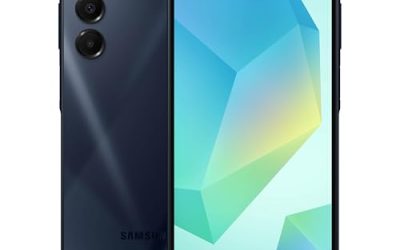
The Motorola Moto G Power 5G (2024) is the budget pick in this guide and the only non-Pixel phone here, included because it offers an officially unlockable bootloader at a much lower budget than any Pixel. It runs a MediaTek Dimensity 7020 processor with 8GB of RAM and 128GB of storage, and its 6.7-inch IPS LCD display runs at 120Hz with a 2400 by 1080 resolution. The 5,000mAh battery supports 30W wired charging and 15W wireless charging, a rare combination at this level. The camera system pairs a 50MP main sensor with an 8MP ultrawide, plus a 16MP front camera, and the phone includes a microSD card slot and a vegan leather finish on the Midnight Blue version.
Motorola runs an official bootloader unlock program, and this model is listed as unlocked and made for US use with the model number PB000008US. That unlock path is genuine, but buyers should go in with clear eyes. The custom ROM community for Motorola’s budget phones is far smaller than the Pixel community, and official LineageOS builds are not guaranteed for every Moto G variant, so you should confirm that a current build exists for your exact model number before buying.
The hardware itself is strong for the budget, with a large smooth display, a big battery, and expandable storage that no Pixel here offers. The limitations are the IPS LCD panel rather than OLED, a mid-range chip that is slower than the Tensor G3, and Motorola’s shorter software support window.
Pros:
– Official Motorola bootloader unlock program and factory-unlocked US model
– Large 6.7-inch 120Hz display with a 5,000mAh battery
– MicroSD card slot for expandable storage
– Wireless charging included at a budget level
– Lowest budget entry point in this guide
Cons:
– Much smaller custom ROM community than the Pixel phones
– Official LineageOS support is not guaranteed for this exact variant, so verify before buying
– IPS LCD display rather than OLED
– Shorter software support window than Google’s seven-year promise
Which One Fits You
Choose the Pixel 8 if you want the best balance of ROM support, size, and capability, since it has official LineageOS builds, factory images, and a compact body that is easy to carry. Choose the Pixel 8 Pro if you want the widest ROM selection and the most future-proof hardware, with 12GB of RAM, the largest battery, and nine projects shipping current builds. Choose the Pixel 8a if your budget is tight but you still want the full Pixel flashing experience, because it shares the same chip, the same official LineageOS support, and the same seven-year update promise as its siblings. Choose the Motorola Moto G Power 5G (2024) if you want the lowest budget entry point and expandable storage, but only after confirming that a current ROM build exists for the exact model number PB000008US.
Frequently Asked Questions
What makes a phone good for custom ROMs?
Three things matter most. First, the bootloader must be unlockable, ideally through a documented process from the manufacturer. Second, the manufacturer should publish factory images so you can return to stock software if a flash fails. Third, an active community should maintain current ROM builds for your exact device codename. The Pixel phones in this guide meet all three.
Do I need an unlocked phone to install a custom ROM?
Yes. Installing a custom ROM requires unlocking the bootloader, and that is only possible on phones where the manufacturer allows it. Carrier-locked phones and many US Samsung models cannot be unlocked, so they cannot run custom ROMs. Always buy a factory-unlocked model and verify the exact model number before purchase.
Is LineageOS available for the Pixel 8, Pixel 8 Pro, and Pixel 8a?
Yes. All three appear on the official LineageOS device list with current Android 17 based builds, under the codenames shiba, husky, and akita respectively. The Pixel 8 Pro also has current builds from GrapheneOS, CalyxOS, Evolution X, RisingOS, and other projects. Always check the official device wiki for your exact codename before flashing.
Will unlocking the bootloader erase my phone?
Yes. Unlocking the bootloader performs a factory reset that erases all data on the phone, including photos, messages, and app data. Back up everything important before you start, and unlock the bootloader before you set the phone up rather than after weeks of use.
Can I still use banking apps on a custom ROM?
It depends on the app. Some banking and payment apps check for an unlocked bootloader or a modified system and refuse to run, while others work normally. This is one of the most common frustrations for custom ROM users, so check whether the apps you depend on tolerate unlocked devices before you commit to flashing your daily driver.
Should I buy the Motorola Moto G Power 5G (2024) for custom ROMs?
It can work as a budget entry point, since Motorola offers an official bootloader unlock program and this model is sold factory unlocked for US use. However, its ROM community is much smaller than the Pixel community, and official LineageOS support is not guaranteed for this exact variant. Confirm that a current build exists for model number PB000008US before buying.
Conclusion
The best unlocked Android phones for custom ROMs are the ones that combine an unlockable bootloader, published factory images, and an active ROM community, and Google’s Pixel 8 family leads on all three counts. The Pixel 8 is the best all-round choice, the Pixel 8 Pro offers the widest ROM selection and the most capable hardware, and the Pixel 8a delivers the same flashing experience at a lower budget. The Motorola Moto G Power 5G (2024) rounds out the list as an affordable entry point with an official unlock program, provided you verify ROM support for your exact model first.
Disclosure: As an Amazon Associate, we earn from qualifying purchases.