Key takeaways
- Compare five travel portable monitors for laptops, from a lightweight 14-inch screen to 15.6-inch USB-C displays with speakers, stands, and one cable.
A second screen changes how a travel workday feels. Instead of flipping between windows on a single laptop display, a portable monitor gives you room to keep a document open on one side and a video call or reference page on the other. The best travel portable monitors pack flat, draw power from the laptop, and set up in under a minute.
Not every portable monitor travels equally well. Some need a second cable for power, some only work over a single cable when the laptop supports a video-capable USB-C port, and some are noticeably heavier than their slim marketing suggests. This guide compares five real portable monitors sold on Amazon, with the cable and power facts for each stated plainly so you can match one to your laptop before you buy.
As an Amazon Associate, we earn from qualifying purchases.
Quick Answer
The ASUS ZenScreen MB16ACV is the best overall travel portable monitor, with a 15.6-inch anti-glare IPS panel, a single USB-C connection for power and video on compatible laptops, and a foldable smart case that doubles as a kickstand. Travelers who want the lightest bag should look at the 14-inch Lenovo ThinkVision M14, while the ViewSonic VG1655 is the pick for people who want built-in speakers and a sturdy stand.
ASUS ZenScreen MB16ACV

The ASUS ZenScreen MB16ACV is the most proven name-brand portable monitor in this roundup, and it earns the top spot by being the least fussy to travel with. Its 15.6-inch full HD IPS panel is anti-glare, flicker-free, and filtered for blue light, which helps on long workdays in bright rooms.
The single hybrid USB-C port carries both power and video when the laptop supports DisplayPort Alt Mode, so most modern laptops need only one cable. Older laptops without a video-capable USB-C port can still use the monitor over a standard USB-A connection with the DisplayLink driver installed. A foldable smart case protects the panel in transit and props it up at several angles.
Specs
– Panel: 15.6-inch full HD IPS, 1920 by 1080 resolution
– Refresh rate: 60 Hz with a 5 ms response time
– Ports: one hybrid USB-C port for power and video
– Display: anti-glare surface, flicker-free, blue light filter
– Stand: foldable smart case that doubles as a kickstand
– Weight: about 1.7 pounds
– Warranty: 3-year maker warranty
ViewSonic VG1655

The ViewSonic VG1655 is the best pick for travelers who want a portable monitor that can stand on its own and sound decent without extra gear. Its built-in stand and magnetic cover hold the screen at a usable angle on a desk, and its dual speakers mean video calls and training videos do not need earbuds or a separate speaker.
The VG1655 connects over USB-C with two-way power delivery, so a compatible laptop sends video to the monitor and the monitor can pass power back through the same cable. A mini HDMI port covers laptops and devices without a video-capable USB-C port, though HDMI carries video only, so a separate USB-C cable is needed for power in that setup. The frameless design keeps the footprint close to a laptop lid.
Specs
– Panel: 15.6-inch full HD IPS, 1920 by 1080 resolution
– Refresh rate: 60 Hz
– Ports: two-way powered USB-C with 60-watt delivery, mini HDMI
– Audio: dual built-in speakers
– Stand: built-in stand with magnetic cover
– Display: eye-care features for long viewing sessions
– Design: frameless panel that packs nearly flat
Lenovo ThinkVision M14

The Lenovo ThinkVision M14 is the lightest monitor in this roundup and the best choice when every ounce in the bag counts. At 14 inches it is a step smaller than the 15.6-inch picks, which makes it easier to slide into a laptop sleeve or a slim backpack, and at about 1.3 pounds it adds barely more weight than a paperback.
The M14 has two USB-C ports and runs from a single cable when the laptop supports DisplayPort Alt Mode, with the second port available to pass power through to the laptop. Its 300-nit full HD IPS panel holds up near windows and in sunlit rooms, and the height-adjustable stand lifts the screen to eye level without a separate riser. The trade-off is the smaller screen, which shows less side by side than a 15.6-inch panel.
Specs
– Panel: 14-inch full HD IPS, 1920 by 1080 resolution
– Brightness: 300 nits
– Response time: 6 ms
– Ports: two USB-C ports for power and video
– Stand: height-adjustable built-in stand
– Weight: about 1.3 pounds
– Display: flicker-free with wide viewing angles
Lenovo L15

The Lenovo L15 is the best mid-range pick for travelers who want a full-size 15.6-inch screen with a proper adjustable stand and no premium markup. Its height-adjustable stand is the same idea as the one on the smaller M14, so the screen can sit at eye level on a desk instead of lying flat or leaning against a bag.
Like its smaller sibling, the L15 has two USB-C ports and runs from a single cable on laptops that support DisplayPort Alt Mode. The full HD IPS panel is rated at 250 nits, which is bright enough for indoor work but a step below the M14 in direct sunlight, and the flicker-free panel is comfortable for long documents and spreadsheets. At about 1.9 pounds it is heavier than the M14, but it is still light enough to carry daily in a laptop bag.
Specs
– Panel: 15.6-inch full HD IPS, 1920 by 1080 resolution
– Brightness: 250 nits
– Refresh rate: 60 Hz
– Ports: two USB-C ports for power and video
– Stand: height-adjustable built-in stand
– Weight: about 1.9 pounds
– Display: flicker-free with wide viewing angles
KYY Portable Screen 15.6
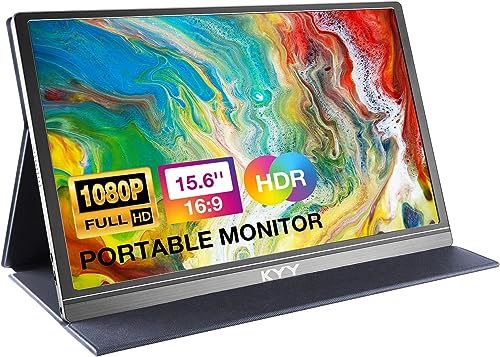
The KYY Portable Screen 15.6 is the budget pick, and it is the best value for travelers who want a large second screen without paying for a brand name. It packs a 15.6-inch full HD IPS panel into a slim 0.3-inch body, includes a smart cover that doubles as a stand, and ships with dual speakers for calls and video.
A full-function USB-C port carries power and video in one cable on compatible laptops, plus an HDMI port for other devices. As with every HDMI setup in this roundup, HDMI carries video only, so a separate USB-C cable is needed for power when using HDMI. The maker lists HDR support and wide viewing angles. One caution when ordering: KYY sells several near-identical 15.6-inch models under separate listings, so pin the exact listing in the reference table below and check the screen size, ports, and included cover before checkout.
Specs
– Panel: 15.6-inch full HD IPS, 1920 by 1080 resolution
– Refresh rate: 60 Hz
– Ports: full-function USB-C, HDMI
– Audio: dual built-in speakers
– Stand: smart cover that doubles as a stand
– Profile: about 0.3 inches thick, about 1.7 pounds
– Display: wide viewing angles with maker-listed HDR support
How to Choose
Start with the port on your laptop, because it decides how many cables you will carry. A laptop with a USB-C port that supports DisplayPort Alt Mode can drive any monitor in this roundup from a single cable. If your laptop has no video-capable USB-C port, plan on using HDMI for video plus a USB-C cable for power, and check whether your laptop can also run the DisplayLink driver that the ASUS model uses over USB-A.
Next, weigh size against weight. A 15.6-inch panel shows more side by side and matches most laptop screens, but it adds bulk and weight. The 14-inch Lenovo M14 is the lightest option here and the easiest to pack, at the cost of a smaller workspace. Brightness matters more than most buyers expect: a 300-nit panel holds up near windows and in bright rooms, while a 250-nit panel is fine for indoor desks and dimmer spaces.
Finally, think about the stand. A foldable smart case works well on a flat desk, a built-in stand is sturdier on uneven surfaces, and a height-adjustable stand is the most comfortable for long sessions because it lifts the screen toward eye level. Speakers are a bonus rather than a deciding factor, since most travelers carry earbuds, but built-in speakers help for quick calls and shared viewing.
Who Should Skip
Travelers who work only from a phone or a tablet should skip a portable monitor, since most phones and tablets cannot drive an external display over USB-C, and those that can still need a power source nearby. If your laptop is older and has neither a video-capable USB-C port nor an HDMI port, a portable monitor will not connect at all, and a laptop stand plus a keyboard is a better use of bag space.
People who need color-accurate work for print or professional photo editing should also look elsewhere. The panels in this roundup are general-purpose IPS displays, and none of them is factory-calibrated for critical color work. Gamers who want high refresh rates should skip as well: every monitor here runs at 60 Hz, which is fine for work and casual play but not for competitive gaming.
Frequently Asked Questions
Can a portable monitor run from a single USB-C cable?
Yes, when the laptop supports DisplayPort Alt Mode. In that setup one cable carries both power and video. If the laptop lacks a video-capable USB-C port, use HDMI for video and add a USB-C cable for power, or use the DisplayLink driver option on the ASUS model.
Does a portable monitor need its own power adapter?
No, for the five monitors in this roundup. All five draw power over USB-C from the laptop or from a USB-C charger. None of them has an internal battery, so they cannot run unplugged, and they will draw down the laptop battery faster than working on the laptop screen alone.
Will a portable monitor work with a MacBook?
Yes, for MacBooks with a USB-C port that supports DisplayPort Alt Mode, which covers most models from recent years. Connect with a single USB-C cable. MacBooks without a video-capable USB-C port need an HDMI adapter plus a USB-C power cable.
Is a 14-inch or a 15.6-inch portable monitor better for travel?
A 14-inch monitor is lighter and packs more easily, which suits frequent flyers and slim bags. A 15.6-inch monitor shows more side by side and matches most laptop screens, which suits longer hotel stays and desk-based work. Choose the size that fits your bag first, since a monitor you leave at home helps no one.
Final Verdict
The ASUS ZenScreen MB16ACV is the best travel portable monitor overall: a proven 15.6-inch panel, single-cable USB-C on compatible laptops, a protective smart case that doubles as a stand, and a 3-year warranty. Travelers who count every ounce should buy the Lenovo ThinkVision M14, the lightest screen here, while the ViewSonic VG1655 is the best all-rounder for people who want speakers and a sturdy built-in stand. The Lenovo L15 is the sensible mid-range full-size pick, and the KYY Portable Screen 15.6 is the best value for travelers who want a large second screen on a tight budget. Check your laptop’s USB-C port before ordering, and glance at the live offer for the Lenovo L15, whose newest listing record is the oldest in this lineup.
Safety Notes
No CPSC recall covers USB-C portable computer monitors as a class, and none of the five monitors in this roundup appears in any recall notice. Two nearby records are worth naming so they are not confused with this product class. The BenQ GV31 portable projector was recalled in July 2026 under CPSC number 26-647 because its lithium-ion battery could overheat, with three overheating reports including one hand burn. That is a battery-powered projector, a different product, and none of the five monitors here has an internal battery. Lorex video monitors for surveillance systems were recalled in 2018 after hundreds of reports of overheating batteries, again a different product with a built-in battery. Practical rule for travel: never pack a swollen, overheating, or recalled battery device inside a closed bag, and keep the monitor in its cover so the panel does not crack in transit.