Our Short List of 3
All 4 Picks at a Glance
| Product | Specs | Action |
|---|---|---|
 ALTO TX408 Powered Speaker | Check price on Amazon | |
 ALTO TX410 Powered Speaker | Check price on Amazon | |
 ALTO TS408 Powered Speaker | Check price on Amazon | |
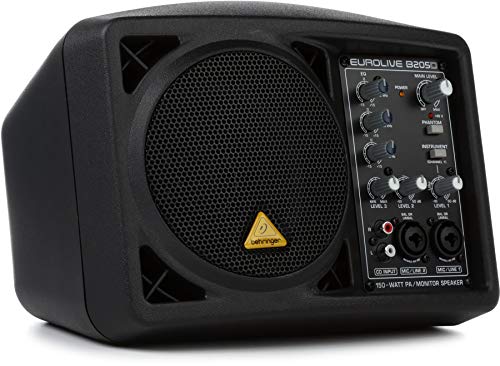 Behringer Eurolive B205D Powered Personal Monitor | Check price on Amazon |
Key takeaways
- Four verified powered monitors for keyboard players, compared by woofer size, mixer channels, wedge position and mounting options for live stage use.
Disclosure: As an Amazon Associate, we earn from qualifying purchases.
Our top pick: ALTO TX408 Powered Speaker. Runner-up: ALTO TX410 Powered Speaker.
A keyboard player hears the gig differently from everyone else on stage. The instrument has no acoustic output of its own, so whatever the monitor sends back is the whole performance: left-hand bass, right-hand voicings, synth layers and piano dynamics all have to survive in one box, at the player’s feet or on a stand beside the rig, while drums and guitar amps compete from a few feet away. A powered monitor solves the practical half of that problem, because the amplifier is built in and the keyboard can run straight into the cabinet without a separate power amp or a long speaker cable run.
This guide covers four powered monitors, each checked against a real Amazon US listing with a verified ASIN. Three of them are Alto powered speakers whose own listings explicitly specify a wedge monitor position and stage monitoring use, and they are framed here around that monitoring duty for a keyboard rig, not as front-of-house mains. The fourth is a dedicated personal monitor in the classic small format, marketed for vocalists and keyboardists. Models whose Amazon US listings could not be verified were left out rather than guessed at, so the guide stays with these four.
Quick Picks
- ALTO TX408 Powered Speaker — Best all-round keyboard monitor: 350 watts, an 8-inch woofer, a 2-channel mixer and a cabinet its listing specifies for wedge monitor use.
- ALTO TX410 Powered Speaker — Best for a fuller low end: the same 350-watt format with a 10-inch woofer and True Wireless Stereo linking over Bluetooth.
- ALTO TS408 Powered Speaker — Best for players who need more headroom: 2000 watts, a 3-channel mixer and app-controlled DSP speaker modes, with a wedge position among its mounting options.
- Behringer Eurolive B205D Powered Personal Monitor — Best close-up personal monitor: a compact 150-watt box that mounts on a mic stand and puts a small mixer within arm’s reach of the keys.
ALTO TX408 Powered Speaker
OUR TOP PICK
The TX408 is the most direct answer to the keyword in this guide, because its Amazon listing does the framing itself: the speaker type is listed as Monitor, the mounting type includes a wedge monitor position alongside a standard 36 mm pole socket, and stage monitoring is named among its specific uses. Alto describes it as an all-purpose solution for live on-stage sound monitoring, which is exactly the job a keyboard player needs filled.
The specification suits a keyboard rig well. It is a 350-watt powered loudspeaker with an 8-inch woofer, and the built-in 2-channel mixer means a single keyboard, or a keyboard plus one more source, can feed the cabinet directly without a separate mixer on stage. Bluetooth is built in, which is handy for playing backing material or break music from a phone during setup. For a keyboardist, the wedge position is the important part: laid back at the feet, the TX408 points up at the player rather than across the stage, so the sound arrives where it is needed and stays out of the way of the audience-facing mix.
Choose the TX408 as the default when one monitor has to cover rehearsals, small gigs and worship or function-band work, and when the rig is one or two keyboards rather than a large multi-board setup. Its 8-inch woofer keeps the cabinet compact on a crowded stage, and the pole socket gives a second placement option when floor space near the rig is taken up by stands and pedals.
The direct-feed arrangement also simplifies the signal path in a way that helps the player. With the keyboard running into the cabinet’s own mixer, the monitor level sits under the player’s hand rather than depending entirely on whoever is running the main desk, and a short cable run from rig to wedge keeps the setup quick at changeovers. For a rehearsal room, the same cabinet can stand on its pole socket and cover the whole band at modest volume, then go back to wedge duty at the gig without any change of settings beyond level.
Specs
– Model: TX408XUS, TX4 Series
– Power: 350 watts, as stated on the listing
– Woofer: 8-inch
– Mixer: 2-channel, built in
– Speaker type: Monitor, as stated on the listing
– Mounting: standard 36 mm pole socket and wedge monitor position, as stated on the listing
– Wireless: Bluetooth
Pros
– Listing explicitly specifies wedge monitor use and stage monitoring
– Built-in 2-channel mixer takes a keyboard feed directly
– Compact 8-inch format with both wedge and pole placement
Cons
– A general powered speaker design rather than a wedge-only cabinet
– One cabinet gives the player a single monitoring position; larger rigs may want a second unit
ALTO TX410 Powered Speaker
The TX410 is the step up within the same TX4 family, and the sensible runner-up when the TX408’s low end is not quite enough. It keeps the 350-watt rating and the 2-channel mixer, but moves to a 10-inch woofer, which matters for keyboards more than for most instruments: piano and synth parts reach down into bass territory that a smaller cone reproduces thinly, and left-hand lines in particular benefit from the larger driver.
Its listing again names the mounting type as a standard 36 mm pole socket and wedge monitor, and Alto’s copy describes it as ideal for live on-stage sound monitoring and usable as a floor wedge. Bluetooth streaming is included, with True Wireless Stereo linking, so a pair of TX410s can be linked wirelessly as a stereo pair. That is a genuinely useful option for a keyboard player, because keyboards are stereo instruments: a linked pair, one at each side of the rig or one as a wedge and one on a pole, restores the stereo image that a single monitor collapses.
Pick the TX410 over the TX408 when the repertoire is bass-heavy, when the stage is loud enough that the monitor has to work harder, or when a stereo pair is part of the plan from the start. The trade-off is size: a 10-inch cabinet takes more floor space in the wedge position and more room in the car.
Specs
– Model: TX4 Series
– Power: 350 watts, as stated on the listing
– Woofer: 10-inch
– Mixer: 2-channel, built in
– Mounting: standard 36 mm pole socket and wedge monitor, as stated on the listing
– Wireless: Bluetooth streaming with True Wireless Stereo linking
Pros
– 10-inch woofer gives left-hand and synth bass more weight
– True Wireless Stereo linking supports a stereo pair for a stereo instrument
– Same direct-feed 2-channel mixer as the TX408
Cons
– Larger cabinet than the TX408 in the wedge position
– Still a powered PA speaker format framed for monitor duty, not a dedicated wedge-only design
ALTO TS408 Powered Speaker
The TS408 comes from Alto’s higher TS4 series and is the headroom option in this guide. It is a 2000-watt powered speaker with an 8-inch woofer, and its listing states that the cabinet can be used freestanding, pole-mounted, flown, or as a wedge monitor. That wedge position is its qualifying role here: tipped back at the keyboard player’s feet, it works as a stage monitor with far more output in reserve than the TX models, which suits loud stages where a monitor has to cut through a full band at close range.
The mixer is a step up as well. The integrated 3-channel mixer provides two mic/line channels plus a Bluetooth channel, so a keyboard rig with two instruments, or a keyboard and a vocal microphone, can be blended at the cabinet itself. Bluetooth streaming and True Stereo Wireless linking are included, and the DSP Speaker Use modes are adjusted through the Alto app, letting the player pick a voicing intended for the way the cabinet is being used rather than living with a single fixed curve.
The TS408 makes sense when one cabinet has to be flexible: a wedge for the keyboard rig on band gigs, a pole-mounted speaker for solo work, and a small standalone system for rehearsals. Players who only ever need a quiet wedge beside the keys will not use most of that capability, and for them the TX408 above is the more proportionate choice.
Specs
– Model: TS4 Series
– Power: 2000 watts, as stated on the listing
– Woofer: 8-inch
– Mixer: integrated 3-channel mixer, two mic/line channels plus a Bluetooth channel
– Placement: freestanding, pole-mounted, flown, or wedge monitor, as stated on the listing
– Control: DSP Speaker Use modes via the Alto app
– Wireless: Bluetooth streaming and True Stereo Wireless linking
Pros
– Far more output in reserve for loud stages
– 3-channel mixer covers two instruments or an instrument plus a microphone
– App-controlled DSP modes and several placement options, including wedge
Cons
– More power and features than a quiet rehearsal or small-gig wedge role requires
– App-based adjustment is one more device to manage during setup
Behringer Eurolive B205D Powered Personal Monitor
The B205D is the odd one out in this guide in the best way: it is the one dedicated personal monitor form factor in the set, a small powered box designed to sit close to the performer rather than across the stage. Behringer markets it as a stage monitor for vocalists and keyboardists, which makes it the closest match in shape and intent to a monitor bought purely for the keyboard chair.
Its specifications come from maker and retailer copy rather than a captured Amazon US listing, so treat the figures as the manufacturer’s published specification and confirm them on the product page. It is a 150-watt Class-D active monitor with a 5.25-inch full-range neodymium driver, and it weighs 7.05 pounds. The mixer section is the reason keyboard players like this format: a 3-channel mixer with 3-band EQ, dual XLR/TRS combo mic/line inputs with phantom power, and an RCA line input, all on the box itself. It mounts on a mic stand, so it can sit at ear height right beside the keyboard stand, close enough that it does not need to be loud to be clear.
That closeness is the point. A personal monitor at arm’s reach lets a keyboardist hear detail, adjust the balance between two keyboards, and tweak EQ without walking across the stage or asking the sound engineer for changes. The limits follow from the size: a 5.25-inch driver will not reproduce deep synth bass with authority, and 150 watts in a small cabinet is a nearfield tool, not a solution for a loud stage where the monitor has to compete from the floor. One further caution: the ASIN for this model was verified from a United Kingdom listing copy rather than a captured Amazon US listing, so check the live US product page carefully before ordering.
Specs
– Power: 150 watts, Class-D, as stated in maker copy
– Driver: 5.25-inch full-range neodymium
– Mixer: 3-channel with 3-band EQ
– Inputs: dual XLR/TRS combo mic/line with phantom power, plus RCA line input
– Mounting: mic-stand mountable
– Weight: 7.05 lb, as stated in maker copy
Pros
– Dedicated personal monitor format, marketed for keyboardists and vocalists
– Mixer, EQ and inputs on the box, within reach while playing
– Mic-stand mounting puts it at ear height in very little stage space
Cons
– Small driver limits deep bass reproduction
– ASIN verified from a UK listing copy; confirm the live US listing before ordering
How to Choose
Start with placement, because it decides the format. A wedge on the floor suits a player who stays at one rig and wants the sound angled up from the feet; all three Alto models in this guide list a wedge monitor position. A personal monitor on a mic stand, like the B205D, suits a player who wants the source close to the ears and the controls within reach, and it takes almost no floor space on a tight stage.
Next, count the inputs the rig actually needs. A single keyboard can feed any monitor here directly. Two keyboards, or a keyboard plus a vocal microphone, point to the 3-channel mixers on the TS408 and the B205D. The 2-channel mixers on the TX408 and TX410 cover one stereo keyboard or two mono sources, and a small external mixer can always sit between a bigger rig and any of these cabinets.
Then think about low end and volume together. Keyboards produce genuine bass, so woofer size matters: the TX410’s 10-inch driver is the better match for piano and synth work with a busy left hand, while the 8-inch models keep cabinets smaller. Raw power is a separate question: the TS408’s rating gives it headroom for loud stages, while the B205D’s modest output is deliberate, because a nearfield monitor does not need to fill a room.
Finally, consider stereo. A keyboard’s output is stereo, and a single monitor sums it to mono. If hearing the stereo image matters, the Bluetooth True Wireless Stereo linking on the TX410 and TS408 lets a pair work as a stereo set without extra cabling, and any two matching cabinets can be fed left and right from the keyboard’s outputs in the conventional wired way.
Do not overlook the feed to the rest of the band. On most gigs the keyboard also has to reach the front-of-house desk, either from a second keyboard output, a splitter, or a small mixer of the player’s own. Decide that path before choosing the monitor, because it affects how many channels and outputs the rig needs. A monitor with its own mixer, like the models here, keeps the player’s foldback independent of that house feed, so a level change at the desk does not silently change what the player hears.
FAQs
Can a powered PA speaker really work as a keyboard stage monitor?
Yes, when the cabinet supports a monitor position. The three Alto speakers in this guide are powered PA speakers, but their own listings specify a wedge monitor placement and stage monitoring use, and their built-in mixers accept a keyboard feed directly. Tipped into the wedge position at the player’s feet, they do the same job as a dedicated wedge: they point the player’s own sound back at the player. They are framed in this guide around that monitoring duty, not as front-of-house mains.
Why is there only one dedicated personal monitor in this guide?
Because only verified listings were used. Several well-known dedicated powered wedges are sold through music retailers, but their Amazon US listings could not be ASIN-verified from listing copy in the research for this guide, so they were excluded rather than guessed at. The B205D is included as the dedicated personal monitor option because it is explicitly marketed for keyboardists and vocalists, with the caution that its ASIN rests on a UK listing copy and needs a live check on the US product page.
Do I need a mixer between my keyboards and a powered monitor?
Not always. Every model in this guide has a built-in mixer: 2-channel on the TX408 and TX410, and 3-channel on the TS408 and the B205D. A single keyboard, or a small rig, can plug straight in and balance levels at the cabinet. A separate mixer earns its place when the rig has several keyboards and modules, when the same feed must also go to the front-of-house desk, or when the player wants one master volume control for the whole rig before the monitor.
Conclusion
For most keyboard players, the ALTO TX408 is the top pick: its listing specifies wedge monitor use outright, its 2-channel mixer takes a keyboard feed directly, and its 8-inch format fits a crowded stage. The TX410 is the runner-up for players who want a 10-inch woofer under their left hand or a wirelessly linked stereo pair. The TS408 adds serious headroom, a 3-channel mixer and app-controlled DSP for loud stages and multi-role use, while the Behringer B205D is the close-up personal monitor for players who want a small mixer at ear height beside the keys — with a live check of its US listing advised before ordering. Whichever format fits, measure the space at the rig first, and confirm the monitor position works with the stands and pedals already on the floor.