Our Short List of 3

All 4 Picks at a Glance
| Product | Specs | Action |
|---|---|---|
| 1. Honeywell Home T9 WiFi Smart Thermostat with Smart Room Sensor | Check price on Amazon | |
 2. Honeywell Home T10 Pro Smart Thermostat with RedLINK | Check price on Amazon | |
 4. Honeywell Home T6 Pro Smart Thermostat | Check price on Amazon | |
 5. Honeywell Home T5 Smart Thermostat | Check price on Amazon |
Key takeaways
- Compare the best WiFi Honeywell thermostats — T9 with room sensors, T10 Pro, Smart Color, T6 Pro Smart and T5 — by sensors, stages, C-wire needs and smart home support.
As an Amazon Associate we earn from qualifying purchases.
Affiliate Disclosure: This article contains affiliate links. If you buy through a link on this page, we may earn a commission at no extra cost to you. Specifications are taken from Honeywell Home and the retailer product pages for each model, and compatibility with your heating and cooling system should be confirmed before you order.
How to choose between Honeywell WiFi thermostats
Honeywell, sold for homes under the Honeywell Home name by Resideo, makes more WiFi thermostats than any buyer needs to sort through alone. The models look similar on a wall, share much of the same app experience, and then differ in the details that actually decide whether one suits your house: whether it can sense temperature in rooms other than the hallway, how many heating and cooling stages it controls, whether it needs a common wire, which voice assistants and smart home platforms it joins, and whether it is a retail model you install yourself or a Pro model designed for contractor channels.
Start with your system, not with features. Note whether you have a conventional furnace and air conditioner or a heat pump, count your heating and cooling stages if you can, and check whether a C-wire reaches your current thermostat. Most Honeywell WiFi models need that common wire for reliable power, and the honest answer for a house without one is either to run a wire, use a manufacturer-approved adapter solution where the model supports it, or choose a model and installation path your installer confirms. A thermostat that loses power or behaves erratically because it is trying to steal power from the heating system is not a bargain at any specification.
Then decide what problem you are really solving. If one room is always too hot or too cold, a thermostat that only reads its own location cannot fix that, and a sensor model such as the T9 or T10 Pro moves to the top of the list. If your house is evenly tempered and you mainly want app control, scheduling and voice control, the Smart Color, T6 Pro Smart and T5 all do that job with different screens, stage support and installation traditions. Every pick below is a genuine Honeywell WiFi thermostat. There are no other brands in this guide, because the search was for the best Honeywell model, not the best thermostat overall.
The picks at a glance
- Best for uneven rooms: Honeywell Home T9 with Smart Room Sensor
- Best Pro model with sensors: Honeywell Home T10 Pro Smart with RedLINK
- Best colorful touchscreen: Honeywell Home Wi-Fi Smart Color Thermostat
- Best straightforward Pro install: Honeywell Home T6 Pro Smart
- Best simple retail pick: Honeywell Home T5 Smart Thermostat
1. Honeywell Home T9 WiFi Smart Thermostat with Smart Room Sensor
The T9 is the Honeywell WiFi thermostat most homes should look at first, because it solves the most common comfort complaint in a way a wall-only thermostat cannot. This listing includes one Smart Room Sensor, and the product page explains that sensors can be placed in the rooms that matter, report temperature and humidity back to the thermostat, and work across a range of up to 200 feet. You can focus control on chosen rooms on a schedule, focus on rooms where motion shows people are present, or let the thermostat average across several sensed rooms.
That changes real evenings. A thermostat in a cool hallway will keep calling for heat long after a sunny living room is warm enough, and it will stop cooling while a west-facing bedroom is still hot. With a sensor in the bedroom, the T9 can prioritize that room at night and the living areas during the day. The included sensor is the starting point rather than the ceiling, because the system is designed to work with additional sensors in more rooms, sold separately.
The rest of the specification is complete for a mainstream retail smart thermostat. The product page lists a color touchscreen, WiFi connectivity on both the 2.4 GHz and 5 GHz bands in the manufacturer’s comparison on the page, geofencing through the Resideo app for automatic home and away behavior, monthly energy reports, and control through Amazon Alexa and Google Assistant among the listed controller types. The listed dimensions are about 3.7 by 4.92 by 0.94 inches, the style in this listing is white, and the page lists a two-year limited warranty in its item details. The T9 in this configuration is also listed as Energy Star certified in the product information.
Be clear about installation. The T9 needs the wiring its installation guide specifies, including a common wire for power in normal installations, and it is a low-voltage thermostat, so it does not suit line-voltage electric baseboard heating. The guided setup described on the product page, with lettered wire terminals on the wall plate and self-configuration once mounted, is genuinely simpler than older thermostat swaps, but it does not remove the need to photograph your old wiring and turn off power to the equipment first.
Choose the T9 if uneven room temperatures are your main problem and you want the sensor included in the box. Skip it if your home is small and evenly tempered, because you would be paying for sensing you will never use, or if your system needs the wider professional stage and accessory control of the T10 Pro below.
2. Honeywell Home T10 Pro Smart Thermostat with RedLINK
The T10 Pro is the professional sibling of the T9 idea. The product listing describes it as a T Series thermostat using both RedLINK and WiFi capability, and that RedLINK wireless link is the headline difference: it is Honeywell’s established professional wireless system for connecting room sensors and other accessories, widely used by installers. This listing is identified as the builder model, so read the listing contents carefully to see exactly which sensor, if any, is included in the box before you compare it against a retail T9 bundle.
Where the T10 Pro earns its place is in more demanding systems. Pro T Series thermostats are built for multi-stage conventional and heat pump systems and for accessory control such as humidification, dehumidification and ventilation in properly configured installations, which is why they are normally specified and installed by contractors who set up the equipment type and staging correctly. If your home has a two-stage furnace, a heat pump with auxiliary heat, or whole-home humidity equipment, that professional configuration depth matters more than any touchscreen feature.
For the homeowner, the daily experience is familiar Honeywell Home app control, scheduling and remote access over WiFi, with room sensing through RedLINK sensors where they are fitted. The thermostat can prioritize sensed rooms much as the T9 does, but the purchasing route is different. Pro models are not primarily retail products, warranty handling and support can run through the installing contractor, and a self-installer should confirm that route before buying a Pro thermostat through a marketplace listing.
Choose the T10 Pro if you have a multi-stage or accessory-heavy system and an installer involved, or if your home already uses RedLINK accessories. Skip it if you want a simple retail box with a sensor included and a direct consumer support path, because that is exactly what the T9 above is designed to be.
3. Honeywell Home Wi-Fi Smart Color Thermostat
Model: RTH9585WF1004 — ASIN: B075BF6V58
The Smart Color Thermostat is the long-running Honeywell WiFi model built around its display. The listing describes a 7-day programmable thermostat with a color touch screen that can be customized to match a room, Energy Star certification and Alexa readiness. Instead of blending into the wall, this thermostat is meant to be looked at: the screen shows indoor conditions and the weather information the connected service provides, and the color can be changed to suit the decor.
Under the display, it covers the connected basics that made this generation of Honeywell thermostats popular. You get WiFi remote control through the Honeywell Home app experience for this model family, a full 7-day program with different schedules for different days, and voice control through Amazon Alexa as listed. For a household with a predictable weekly routine, a well-built 7-day schedule is still the feature that does most of the daily work, with app control handling the exceptions when the routine changes.
The limits are the generation it comes from. There is no remote room sensor system here, so the thermostat controls to the temperature where it is mounted, like the T5 and T6 below. It is also a model that in normal installations requires a C-wire, a point Honeywell’s own materials for this thermostat have always been explicit about, and it does not suit line-voltage heating. Check the stage compatibility for your exact system in the listing and manual, especially with heat pumps, before treating it as a universal replacement.
Choose the Smart Color if you want a bright, customizable touchscreen and a proven 7-day programmable WiFi thermostat, and your home’s temperature is reasonably even. Skip it if room-to-room imbalance is your problem, because no display feature compensates for sensing in the wrong room.
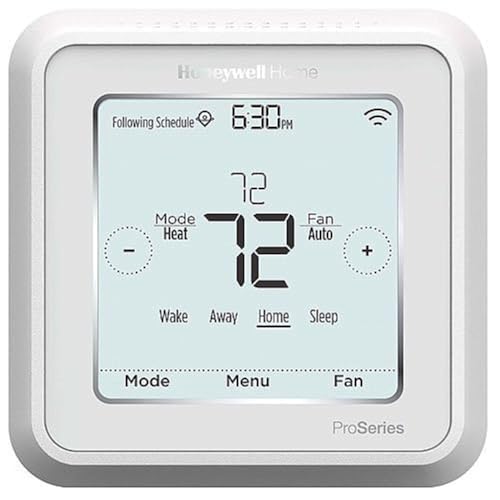
4. Honeywell Home T6 Pro Smart Thermostat
The T6 Pro Smart is the workhorse Pro model: less showy than the Smart Color, less sensor-focused than the T9 and T10 Pro, and specified by a great many installers as a dependable WiFi thermostat for ordinary systems. The listing for the TH6220WF2006 describes a WiFi programmable thermostat supporting up to 2 heat and 1 cool stages on a heat pump system, or 2 heat and 2 cool stages on a conventional system, which covers the large majority of North American homes without exotic staging.
That stage specification is the right way to judge this model. If it matches your equipment, the T6 Pro Smart gives you app control, scheduling that can be programmed on the thermostat or through the app, and integration with major smart home platforms in the Honeywell Home ecosystem, in a unit an installer can configure quickly and a homeowner can use without learning a complicated interface. The UWP mounting system shared across this Honeywell generation also makes later replacement within the family simpler, because the wall plate system is common.
As with the T10 Pro, remember the channel. The T6 Pro is a Pro product, so confirm what is in the box, who handles warranty support and whether your installer is happy to set up a unit you supplied. Homeowners buying one directly should also confirm the common wire requirement for their installation and the exact equipment configuration during setup, because a heat pump configured as a conventional system, or the reverse, will behave badly no matter how good the thermostat is.
Choose the T6 Pro Smart if your stages match its published limits and you want a plain, professional WiFi thermostat that concentrates on doing the core job reliably. Skip it if you need room sensors, because this model does not offer the T9 and T10 sensor story, or if your system has more stages or accessory control needs than this version covers, where the wider T6 range or the T10 Pro is the correct conversation to have with an installer.
5. Honeywell Home T5 Smart Thermostat
The T5 is the simplest current retail route into a Honeywell WiFi thermostat. The listing for this generation, model RTH8800WF2022, describes a 7-day programmable touchscreen thermostat with geofencing technology, Energy Star certification and Alexa readiness, and it states plainly that a C-wire is required. Its Honeywell Home product information lists WiFi on the 2.4 GHz band, a square touchscreen format, and support across a wide set of platforms for this model family including Amazon Alexa, Google Assistant and Apple HomeKit among the integrations Honeywell lists for the T5.
Geofencing is the feature that separates the T5 from a merely programmable thermostat. Using your phone’s location through the app, the thermostat can ease the temperature back when the last person leaves and restore comfort as someone returns, which suits households whose schedules do not repeat neatly enough for a fixed program to capture. Combined with the 7-day schedule, it covers both kinds of household: set the baseline week, then let location handle the irregular days.
The boundaries are clear and, for many homes, acceptable. The T5 reads temperature at its own location only, so it cannot prioritize a bedroom the way a T9 with a sensor can. Its 2.4 GHz WiFi is normal for thermostats and is not a practical drawback, but your router needs to offer that band, as almost all do. And the stated C-wire requirement is real: plan for it during installation rather than discovering it with the old thermostat already off the wall.
Choose the T5 if you want Honeywell app control, scheduling and geofencing in a clean retail package and your rooms are evenly tempered. Skip it if you need remote sensors, a 5 GHz connection as listed for the T9 configuration above, or a thermostat for a system your installer says needs Pro stage and accessory configuration.
C-wire, compatibility and installation: read this before you buy
The C-wire question comes first. A WiFi thermostat is a small always-on computer with a radio and a color or touch display. It needs continuous power, and on most low-voltage systems that means a common wire. Several listings in this guide state the requirement directly. If you have an unused conductor in the thermostat cable, an installer can often land it as a C-wire at both ends. If you do not, discuss the approved options for your chosen model with an installer rather than improvising.
Confirm your system type. All five models are low-voltage thermostats for systems such as gas or oil furnaces with air conditioning, and heat pumps within their stated stage limits. None of them is a line-voltage thermostat for electric baseboard heaters. Millivolt systems, proprietary communicating systems and some older two-wire heat-only setups need specific checking against the model’s manual, not an assumption.
Match the stages. A single-stage furnace and air conditioner is easy. Multi-stage equipment, heat pumps with auxiliary or emergency heat, and accessories such as humidifiers narrow the field. That is where the published stage figures for the T6 Pro Smart and the professional configuration of the T10 Pro stop being fine print and become the decision itself.
Photograph before you disconnect anything. Turn off power to the heating and cooling equipment, photograph the old thermostat’s wiring with every letter designation readable, label the wires, and only then swap. Most failed smart thermostat installations are wiring or configuration problems, not faulty thermostats, and a clear photo is the difference between a ten-minute fix and a service call.
Which Honeywell WiFi thermostat should you buy?
Buy the T9 if one thermostat location cannot represent your home and you want a room sensor in the box. Buy the T10 Pro if your system is multi-stage or accessory-heavy, RedLINK is already in the house, or an installer is specifying the job. Buy the Smart Color if a customizable color touchscreen and a mature 7-day program are what you want on the wall. Buy the T6 Pro Smart if its stage limits match your equipment and you want a professional, no-nonsense WiFi thermostat. Buy the T5 if you want the simplest retail Honeywell with scheduling and geofencing and your home heats and cools evenly.
Whichever model you choose, confirm three things on the product page and in the manual for your exact system before ordering: that your system type and stages are supported, that you have or can provide a common wire, and that the box contents, especially sensors on Pro and builder listings, are what you expect. Availability of specific Honeywell models and bundles changes over time, so confirm the current listing for the exact model number above rather than ordering a similarly named variant.