Key takeaways
- Searching for the best battery pack for HoloLens? Compare five USB-C PD power banks that clear the 15W minimum and keep your headset running for longer.
The best battery pack for HoloLens is a USB-C Power Delivery power bank that can sustain at least 15W, because that is the threshold Microsoft sets for maintaining or advancing the charge on a HoloLens 2 while the device is in use. The headset’s built-in battery is rated for about 2 to 3 hours of active use, so anyone running long training sessions, factory walkthroughs, or design reviews will hit the limit mid-task without extra power. A pocket power bank connected by a USB-C cable is the practical fix, and it works because HoloLens 2 charges over USB-C and stays fully functional while charging.


Quick answer: pick the Anker Power Bank 10,000mAh 30W if you want the simplest default, with a built-in USB-C cable and enough output to clear the 15W floor with room to spare. Pick the INIU P41 if you want the highest output in the slimmest body. Pick the NEWDERY neck battery if you want hands-free wear with the weight off your head. Every pick below is a general-purpose USB-C PD power bank rather than a HoloLens-specific accessory, because no HoloLens-specific battery pack is sold on Amazon.
Quick Picks
Our Short List of 3
All 4 Picks at a Glance
| Product | Specs | Action |
|---|---|---|
| Anker Power Bank 10,000mAh 30W — Best Overall | Check price on Amazon | |
| INIU P41 10,000mAh 45W — Highest Output in the Slimmest Body | Check price on Amazon | |
 NEWDERY Neck Battery Pack 10,000mAh — Best Hands-Free Wear | Check price on Amazon | |
 HALO RapidPack 10K DLX — Best Simple Pack With a Display | Check price on Amazon |
How to Choose
Start With Wattage, Not Capacity
Capacity in milliamp-hours gets the attention, but wattage decides whether a pack helps at all. Microsoft’s own charging guidance for HoloLens 2 states that the supplied wall charger delivers 18W, that a charger should support at least 15W to maintain or advance the internal battery charge while the device is on, and that the headset can accept USB Power Delivery sources up to 27W. A source able to supply at least 10W can extend operating time, but below 15W the headset may still lose charge slowly under heavy workloads. That makes 15W the real minimum and 18W to 30W the comfortable zone. Every pack in this guide clears 15W on its USB-C port. Check the USB-C output figure on the listing, not the headline capacity, and ignore any pack that only lists a USB-A output, since a USB-A to USB-C cable limits charging to 7.5W according to Microsoft.
USB-C Power Delivery and the TRY.SRC Trap
HoloLens 2 charges through a USB-C port, and the pack you connect must behave as the power source rather than the load. Some USB-C battery packs recharge and provide power through the same USB-C port, and Microsoft warns that such packs must implement TRY.SRC, the USB-C dual-role behavior that ensures the pack charges the headset rather than the other way around. If your HoloLens ends up charging the external battery, the pack does not implement TRY.SRC, and Microsoft recommends switching to a newer pack. The fallback of using a USB-A to USB-C cable avoids the reversed flow, but it caps power at 7.5W, below the 15W needed to hold charge during use, so treat it as a diagnostic step rather than a solution. None of the manufacturers below publish TRY.SRC compliance in their listings, so confirm the direction of power flow on first use: connect the pack and check that the HoloLens battery level rises or holds steady during a normal session. Buy from a listing with a straightforward return policy so a pack that charges in the wrong direction can go back.
Capacity Versus Weight on Your Head and Body
A 10,000mAh pack is the sweet spot for HoloLens use. It holds enough energy to substantially extend a 2 to 3 hour rated runtime, yet it stays light enough to carry in a pocket, clip to a belt, or hang around the neck without dragging on the headset. Larger packs hold more energy, but they add weight and bulk that matter when you are already wearing a 566 gram headset and moving around a room. All five picks in this guide are 10,000mAh, which keeps the comparison honest: the differences that matter are output, cable setup, and carrying style, not a capacity number. Remember that the labeled capacity is never delivered in full, because energy is lost to heat and voltage conversion between the pack and the headset.
Cable, Carrying Style, and Where the Weight Sits
HoloLens 2 puts its battery and processing in the rear of the headset, and its balance is part of why it stays comfortable. Hanging a power bank from the headset itself would upset that balance, so the better setups keep the pack on your body and run a short cable to the USB-C port on the right side of the rear housing. A built-in USB-C cable, as on the Anker and INIU picks, removes the most common failure point in the field: the forgotten or damaged loose cable. A belt clip or lanyard, as on the JSAUX, keeps the pack secure while you walk. A neck-worn pack, as on the NEWDERY, distributes weight across the shoulders and leaves both hands free. Whatever style you choose, keep the cable short enough that it cannot snag on equipment, and route it so it does not pull on the headset when you turn your head.
Pass-Through Charging and Recharge Speed
Pass-through charging lets a pack power the headset while the pack itself recharges from a wall outlet, which matters at the end of a session when you want both devices ready for the next one. The INIU P41 supports pass-through charging according to its listing. Also check how fast the pack itself refills: a pack that takes all night to recharge becomes the bottleneck between morning and afternoon sessions, while a pack with two-way USB-C PD refills in a few hours from a suitable wall charger. The Anker pick provides 30W two-way charging, so the same port that powers the headset also refills the pack quickly.
Safety Marks and Flight Rules
A battery pack for workplace use should come from an established brand with stated safety protections, and all five picks here are sold under recognized power-bank brands. Check the listing for overcharge, short-circuit, and temperature protection, and avoid unbranded packs that list no protections at all. For travel, airlines generally allow lithium-ion power banks up to 100Wh in carry-on luggage, and a 10,000mAh pack sits at roughly 37Wh, comfortably inside that limit. Keep the pack in your carry-on, never in checked luggage, and confirm your airline’s current rules before flying. Also note the headset itself is designed for use between 10 and 35 degrees Celsius; a pack left in a hot vehicle or in direct sun will perform poorly and may shut down for safety.
The Best Battery Pack for HoloLens Reviewed
Anker Power Bank 10,000mAh 30W — Best Overall
The Anker Power Bank with 10,000mAh capacity and 30W USB-C output is the most straightforward pick for HoloLens 2. Its 30W output clears the 15W minimum with a wide margin and sits just above the headset’s 27W USB Power Delivery ceiling, so the headset draws what it needs and no more. The built-in USB-C cable is the feature that matters most in daily use: it is always attached, so there is no loose cable to forget, and it connects directly to the HoloLens USB-C port. Extra USB-C and USB-A ports are available for a second device, and the 30W two-way charging refills the pack itself quickly between sessions. This is a general-purpose power bank, not a HoloLens-specific accessory, and it connects to the headset with a standard USB-C cable rather than any HoloLens mount.
INIU P41 10,000mAh 45W — Highest Output in the Slimmest Body
The INIU P41 pairs a 10,000mAh capacity with a 45W maximum USB-C PD output, the highest output in this guide, in a body that measures about 5.26 by 2.7 by 0.5 inches and weighs about 6.42 ounces. That combination is valuable for HoloLens use because the extra wattage headroom means the pack is never the limiting factor, while the thin profile slips into a pocket without pulling on the cable. The pack includes a detachable braided USB-C cable, two USB-C ports and one USB-A port, so it can charge three devices at once, and it supports pass-through charging, so it can power the headset while it recharges from the wall. INIU backs the P41 with a 3-year INIU Care warranty. The 45W figure exceeds the 27W maximum the HoloLens 2 accepts over USB PD, which is not a problem: the headset negotiates only the power it can use. This is a general-purpose power bank, not a HoloLens-specific accessory, and the headset connects through the included USB-C cable.
JSAUX Battery Pack 10,000mAh PD — Best Belt Clip and Lanyard Carry
The JSAUX battery pack is a 10,000mAh PD power bank built around wearable carry, with a belt clip and a lanyard that let it ride on your body while the headset stays unencumbered. It is marketed for Meta Quest 3S, Quest 3, Quest 2, PS VR2, and Pico 4 headsets, and the maker quotes several extra hours of playtime for those headsets, but those figures describe Quest use and should not be transferred to HoloLens runtime. What carries over is the part that matters: a 10,000mAh USB-C PD pack with a clip and lanyard, connected to the HoloLens by a USB-C cable. The clip keeps the pack from swinging while you walk a factory floor, and the lanyard gives you a second carry option when a belt is not practical. Partial fit to note: the mounting and marketing are designed around Quest-style headsets, not HoloLens, so use the pack as a body-worn power source with a cable, and do not expect any included mount to fit the HoloLens head strap.
NEWDERY Neck Battery Pack 10,000mAh — Best Hands-Free Wear
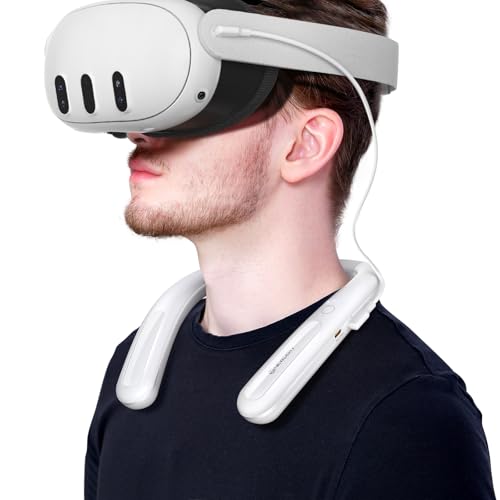
The NEWDERY neck battery pack takes a different approach to the same problem: it hangs around the neck, which spreads the weight across the shoulders and keeps both hands free for gestures, tools, or a controller. It holds 10,000mAh and provides PD fast charging over USB-C, and the maker quotes three to five extra hours of playtime for Meta Quest headsets, a figure that describes Quest use rather than HoloLens runtime. Its stated compatibility covers Meta Quest 3S, Quest 3, Quest 2, Pico 4, Pico 4 Pro, HTC Vive, and PSVR 2, which shows the USB-C connection is standard across headsets, even though the neck-worn form was designed with VR headsets in mind. For HoloLens work that involves walking or presenting, the neck-worn layout is genuinely useful, because the cable run to the headset’s rear USB-C port is short and the pack cannot snag on a belt or pocket edge. Partial fit to note: this is a VR-headset-marketed wearable pack, not a HoloLens-specific accessory, so confirm the cable reaches comfortably before committing to it for long sessions.
HALO RapidPack 10K DLX — Best Simple Pack With a Display
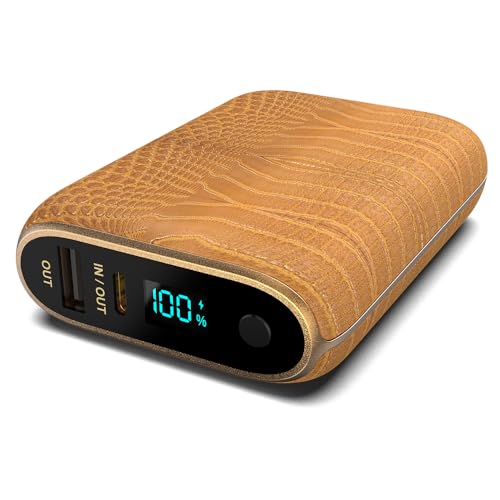
The HALO RapidPack 10K DLX is a 10,000mAh power bank with 20W output, which clears the 15W minimum for HoloLens 2 while leaving less headroom than the 30W and 45W picks above. Its distinguishing features are practical rather than dramatic: a digital display that shows the remaining charge, a bi-directional USB-C port plus a USB-A port, and a synthetic leather wrap that gives it a more finished feel than a bare plastic slab. The 20W output is enough to maintain or advance the headset’s charge during use, which is the test that matters, and the display removes the guesswork of a blinking LED when you are deciding whether the pack is ready for the next session. This is a general-purpose power bank, not a HoloLens-specific accessory, and it connects to the headset with a standard USB-C cable.
What to Check Before You Buy
Confirm the USB-C output is at least 15W, and prefer 18W or more so the headset holds its charge under heavy workloads. Check that the pack charges over USB-C and that the cable you plan to use is USB-C to USB-C, because a USB-A to USB-C cable caps power at 7.5W and will not keep up during use. On first use, verify the direction of power flow: the HoloLens battery level should rise or hold steady, and if the headset is charging the pack instead, the pack lacks the TRY.SRC behavior Microsoft describes and should be returned. Confirm your HoloLens model, since the original HoloLens charges over a different connector than the USB-C port on HoloLens 2. Check the pack’s capacity against airline rules if you fly with it; a 10,000mAh pack is roughly 37Wh and fits the usual 100Wh carry-on allowance, but confirm your carrier’s current policy. Look for stated safety protections and a brand with a real warranty, and keep the return window open until you have run one full session with the pack connected.
FAQ
Can any power bank charge a HoloLens?
No. The pack must deliver enough power over the right connector. For HoloLens 2, that means a USB-C Power Delivery source able to supply at least 15W to maintain or advance the charge while the device is on, and at least 10W to extend operating time at all. A low-output pack or a USB-A to USB-C cable that caps power at 7.5W will not keep up during active use. The pack must also behave as the power source rather than the load, which is the TRY.SRC behavior Microsoft describes in its charging guidance.
How much extra time will a 10,000mAh pack add?
It depends on the workload, because a demanding hologram session draws more power than a light one. Microsoft states that a source able to supply at least 10W can extend operating time, and that 15W is the minimum to maintain or advance the charge while the device is on. In practice, a full 10,000mAh pack used with a suitable USB-C PD connection can extend a HoloLens 2 well beyond its rated 2 to 3 hours of active use, but conversion losses mean the labeled capacity is never delivered in full, so treat any runtime estimate as approximate.
Why is my HoloLens charging the power bank instead?
That happens when the pack does not implement TRY.SRC, the USB-C dual-role behavior that tells the pack to act as the source. Microsoft documents this exact symptom and recommends switching to a newer battery pack. A USB-A to USB-C cable can work around it, but it limits charging to 7.5W, which is below the level needed to hold charge during use, so it is a diagnostic step rather than a fix. If the reversed flow appears on first use, return the pack and choose another one.
Can I wear the HoloLens while it charges from a battery pack?
Yes. HoloLens 2 is fully functional when charging, according to Microsoft’s hardware documentation, and using an external pack while wearing the headset is the normal way to extend a session. Route the cable from the pack on your body to the USB-C port on the right side of the rear housing, keep the cable short enough to avoid snags, and check that the pack is actually delivering power before the session starts.
Is it safe to fly with a 10,000mAh battery pack?
A 10,000mAh pack is roughly 37Wh, which sits comfortably under the usual 100Wh limit for lithium-ion power banks in carry-on luggage. Carry it in your cabin bag, never in checked luggage, and confirm your airline’s current rules before travel, since individual carriers can set stricter limits. Keep the pack protected from heat and physical damage, and do not use a pack that is swollen, cracked, or overheating.
Bottom Line
The best battery pack for HoloLens is the Anker Power Bank 10,000mAh 30W for most people, because its 30W USB-C PD output clears the 15W floor with margin, its built-in cable removes the most common point of failure, and its size suits pocket or pouch carry during long sessions. Choose the INIU P41 if you want the highest output and the thinnest body, the NEWDERY neck pack if you want hands-free wear with the weight off your head, the JSAUX pack if a belt clip and lanyard suit your work, or the HALO RapidPack 10K DLX if a digital display and a simple 20W output are enough. Whichever you pick, confirm the USB-C output, verify the direction of power flow on first use, and remember that every pack here is a general-purpose USB-C PD bank that meets Microsoft’s published charging spec, not a HoloLens-specific accessory.
Disclosure: As an Amazon Associate, we may earn from qualifying purchases.