Key takeaways
- Compare the best digital picture frames from Aura, Nixplay, Skylight, Kodak and BIGASUO by screen, storage, app sharing and mounting options.
A digital picture frame solves a familiar problem: thousands of photos sit on phones and never get seen. A WiFi frame on a shelf or counter lets family members send new pictures to it from anywhere, so the display keeps changing without anyone printing, swapping cards, or handing over a phone. The five frames below come from well-known makers and cover the main approaches, from cloud-based frames with no onboard storage limit stated to budget frames with generous built-in memory.
The differences that matter are screen size and resolution, how photos arrive (an app, an email address, or a memory card), how much storage the maker provides, and whether the frame sits on a stand or can hang on a wall. Every figure in this guide is stated the way the maker states it, so check the current listing for the exact configuration before you order.
As an Amazon Associate, we earn from qualifying purchases.
Quick answer
For most households, the Aura Carver is the simplest premium pick, with free unlimited photo storage through the Aura service as Aura describes it. The Skylight Frame suits gift-givers who want photo delivery by email. Nixplay’s 10.1-inch touch frame adds a touchscreen and playlist sharing, the Kodak frame offers the sharpest screen here, and the BIGASUO Frameo frame delivers 32GB of storage for the least complexity.
How to choose
Start with the screen. Screen size, resolution and panel type are maker-attributed only, so compare the figures each maker publishes rather than assuming two 10-inch frames look the same. A 1280 by 800 panel is common at this size; the Kodak frame below lists a higher 1920 by 1200 resolution. Touchscreens let you swipe and adjust settings on the frame itself, while non-touch frames rely on an app.
Understand how photos get to the frame. App and Wi-Fi photo sharing works per each maker’s service: Aura, Nixplay, Skylight, Kodak and Frameo each run their own system, and the sender usually needs that maker’s free app or, in Skylight’s case, the frame’s unique email address. Some features may need a maker account or subscription as the maker discloses. Skylight, for example, describes an optional Skylight Plus plan for extras such as video sharing, and Nixplay describes paid plans that add cloud storage and features. Nothing here works without Wi-Fi except local card or USB playback where the maker offers it.
Check storage the way the maker states it. Storage figures are maker-attributed only. Cloud frames such as the Aura describe unlimited photo storage on their service, while card-based frames list a fixed internal capacity, such as 8GB on the Skylight or 32GB on the Kodak and BIGASUO models. Photo counts based on those capacities assume average file sizes, so treat them as maker estimates.
Plan the placement. Use wall-mount or stand options per maker instructions: some frames include a detachable stand only, while others are described as wall mountable in landscape or portrait. Auto-rotate and motion-sensor behavior work as the maker states them; a frame with a gravity sensor turns the slideshow when you rotate the frame, and a motion sensor wakes or sleeps the display as the maker describes. Finally, confirm the power setup, since most of these frames run plugged in rather than on batteries.
Aura Carver

The Carver is Aura’s 10.1-inch tabletop frame in the Gravel finish, built around the Aura app and cloud service. Aura states that photos are stored with free unlimited storage on its service, so there is no memory card to manage and no onboard capacity figure to run into. Family members you invite can add photos from their own phones through the app, as Aura describes.
Specs (per Aura)
- Screen: 10.1 inch HD display, 1280 by 800 resolution
- Storage: free unlimited photo storage through the Aura cloud service
- Sharing: Aura app for iPhone and Android
- Extras: built-in speaker for video sound, ambient light sensor for automatic brightness
- Model: UKEU900-BLK (Gravel)
Who it fits: households that want a set-and-forget frame where relatives keep adding photos from their phones. Who should skip: anyone who wants to wall-mount the frame or load photos from a memory card without an account-based service.
Nixplay 10.1 Inch Touch Screen Frame (W10K)

Nixplay’s W10K pairs a 10.1-inch touchscreen with the Nixplay app and cloud playlists. Per Nixplay, you create playlists in the app or by email and the frame pulls them down over Wi-Fi; the touch panel lets you swipe through photos and adjust settings on the frame itself. This Black/Silver listing is the W10K model.
Specs (per Nixplay)
- Screen: 10.1 inch IPS touch display, 1280 by 800 resolution
- Sharing: Nixplay app or email, with shared playlists
- Storage: cloud storage through the Nixplay service; paid plans add capacity and features as Nixplay discloses
- Extras: auto-rotate for portrait or landscape display
- Model: W10K, Black/Silver
Who it fits: families spread across households who like the playlist idea and want a touchscreen. Who should skip: buyers who dislike service-based storage, since the frame depends on the Nixplay service and account for sharing.
Skylight Frame

The Skylight Frame takes the email route: each frame gets its own unique Skylight email address, and anyone who knows it can send photos that appear on the frame. Skylight describes setup as plug in, connect to Wi-Fi, and choose the address, which is why this frame is a common gift for parents and grandparents. The 10-inch touchscreen runs 1280 by 800.
Specs (per Skylight)
- Screen: 10 inch color touch display, 1280 by 800 resolution
- Storage: 8GB internal memory, which Skylight states holds more than 8,000 photos
- Sharing: unique frame email address, plus the Skylight app
- Extras: optional Skylight Plus subscription adds features such as video sharing, as Skylight discloses
- Model: 916496
Who it fits: gift-givers sending a frame to someone who will never install an app, because senders only need an email address. Who should skip: buyers who want large internal storage or who plan to send lots of video without the maker’s optional subscription.
KODAK 10.1 Inch WiFi Digital Picture Frame (RWF-127V)
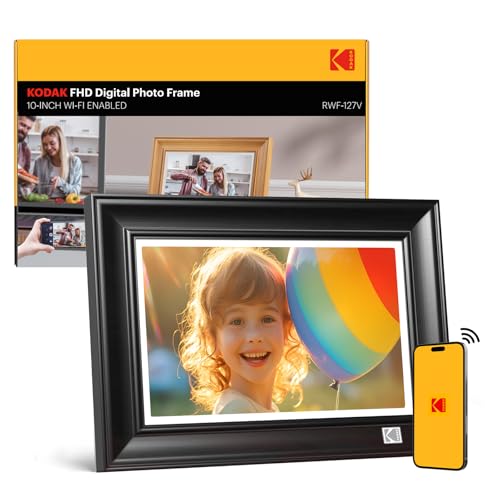
This Kodak frame, made by Maxtalent for Kodak, leads this group on paper with a 1920 by 1200 IPS touchscreen and 32GB of internal memory. Per the maker’s manual, photos and short videos arrive through the KODAK app or the frame’s email address, and you can also play content from an SD card or USB drive. The frame works freestanding on its detachable stand or wall-mounted.
Specs (per Kodak’s manufacturer documentation)
- Screen: 10.1 inch IPS touch display, 1920 by 1200 resolution
- Storage: 32GB internal memory, plus SD card and USB drive support
- Sharing: KODAK app or email
- Extras: auto-rotate, music playback, calendar, clock and weather functions
- Model: RWF-127V
Who it fits: buyers who want the sharpest listed resolution here and the option to load photos locally from cards as well as over Wi-Fi. Who should skip: buyers who prefer a single-brand ecosystem with a long-established app, since this is a licensed Kodak product made by a third-party manufacturer.
BIGASUO Frameo 10.1 Inch WiFi Digital Picture Frame
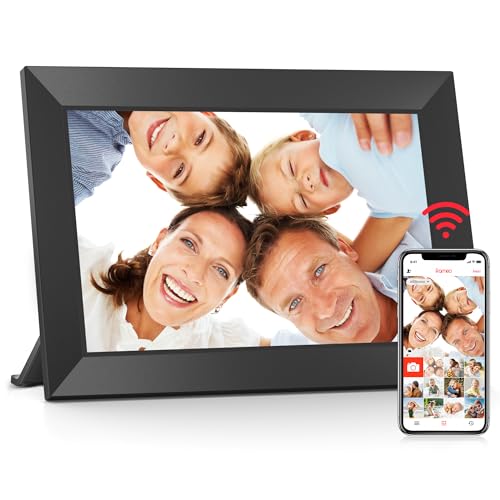
The BIGASUO frame runs the Frameo app, a shared platform used by many frame makers, so senders use the free Frameo app to push photos and short videos over Wi-Fi. The listing states 32GB of built-in memory with microSD expansion, a 1280 by 800 IPS touchscreen, auto-rotate, and a wall-mountable design, which makes it the flexible budget option in this group.
Specs (per BIGASUO)
- Screen: 10.1 inch IPS touch display, 1280 by 800 resolution
- Storage: 32GB built-in memory, microSD card support up to 32GB
- Sharing: Frameo app for iPhone and Android
- Extras: auto-rotate, wall mountable, slideshow and video playback
- Model: 102K
Who it fits: budget-minded buyers who want generous local storage and an app many other frames also use. Who should skip: buyers who want a maker’s own long-term cloud service, since Frameo frames store photos locally rather than in a brand-run cloud.
How they compare
The Aura Carver and Nixplay W10K are service-first frames: storage lives in each maker’s cloud, so capacity worries disappear but the frame leans on that maker’s app and account system. The Skylight also uses a service, yet its email-based sending makes it the easiest for non-technical recipients. The Kodak and BIGASUO frames put storage inside the device, 32GB in both cases, and add card-based loading, which suits buyers who prefer local files. On screens, the Kodak’s 1920 by 1200 panel is the sharpest listed, while the other four sit at 1280 by 800. For wall display, the Kodak and BIGASUO are described as wall mountable; the Carver is a tabletop design. Think about who will send photos most often: if the senders are comfortable with apps, any of these systems works, but if the senders are grandparents with only an email account, the Skylight’s address-based approach removes a real barrier. Also consider viewing distance, because a 10-inch frame suits a desk, shelf or kitchen counter better than the far side of a large living room, where a bigger frame would normally be the better match.
FAQ
Do these frames need a subscription?
Not for basic photo display. Each maker describes its free tier differently, and some features, such as extra cloud storage at Nixplay or video sending at Skylight, sit behind optional paid plans as the makers disclose. Read the plan details on the maker’s site before gifting a frame to someone else.
Can several family members send photos to one frame?
Yes, as each maker describes it. Aura, Nixplay, Kodak and Frameo use invited app users, while Skylight lets anyone with the frame’s unique email address send photos. The exact invitation steps are set out in each maker’s app.
What happens without Wi-Fi?
Wi-Fi frames need a connection to receive new photos. Frames with internal storage or card slots, such as the Kodak and BIGASUO, can keep playing photos already stored on the device or on an inserted card, as the makers describe. Cloud-first frames are more limited offline.
Can these frames hang on a wall?
Only some of them. The Kodak and BIGASUO listings describe wall mounting, and the Kodak manual covers landscape and portrait mounting. Follow each maker’s mounting instructions and hardware guidance rather than improvising a mount for a frame sold as tabletop-only.
Final verdict
Pick the Aura Carver for the smoothest app-and-cloud experience, the Skylight Frame for email-simple gifting, the Nixplay W10K for touchscreen playlists, the Kodak RWF-127V for the sharpest screen and local loading options, or the BIGASUO Frameo frame for 32GB of local storage in a wall-mountable budget design. Whichever you choose, confirm the current model’s screen, storage and sharing terms on the listing, since makers revise these services over time.
Product and ASIN Reference
| Product | ASIN |
|---|---|
| Aura Carver (Gravel) | B09X1XN3FZ |
| Nixplay 10.1 Inch Touch Screen Frame (W10K, Black/Silver) | B09W9C6SF3 |
| Skylight Frame (10 Inch) | B01N7ENHO6 |
| KODAK 10.1 Inch WiFi Digital Picture Frame (RWF-127V) | B0BLXX4Y7T |
| BIGASUO Frameo 10.1 Inch WiFi Digital Picture Frame | B088NHSVJN |