Key takeaways
- Compare five of the best mesh WiFi systems from TP-Link, eero, Google, NETGEAR, and ASUS by maker-rated coverage, bands, ports, and subscription features.
A single router parked next to the modem rarely reaches every room with a strong signal, especially in larger homes, multi-story layouts, or houses with dense interior walls. A mesh WiFi system replaces that one box with several cooperating nodes that broadcast a single network name, hand devices off as you move, and let you add coverage room by room.
The five systems below come from TP-Link, Amazon eero, Google, NETGEAR, and ASUS. Four are WiFi 6E systems with a 6 GHz band; one is a WiFi 6 system that trades that band for a faster wired backbone and more Ethernet ports. Pack sizes differ too: four picks are three-node kits and one is a two-node kit, which matters when you compare the coverage figures each maker advertises. Every speed, coverage, and device figure in this guide is the manufacturer’s own rating, stated under that maker’s test conditions.
As an Amazon Associate, we earn from qualifying purchases.
Quick answer
The TP-Link Deco XE75 3-pack is the balanced default: WiFi 6E, three nodes, and three Ethernet ports per unit. The eero Pro 6E suits buyers who want the simplest app and built-in smart home radios. Google Nest Wifi Pro fits Google Home households. The NETGEAR Orbi 860 is the pick for fast wired backbones and many ports. The ASUS ZenWiFi ET8 2-pack brings deep controls without a subscription, per ASUS.
How to choose
Start with the coverage figure, but read it as a rating, not a promise. Makers measure coverage in their own test homes, and real results depend on your floor plan, wall and floor materials, and interference from neighboring networks. A kit rated for a large open-plan home may cover far less in a brick house with small rooms. When in doubt, favor systems that let you add a single extra node later.
Band layout is the second decision. WiFi 6E systems add a 6 GHz band that WiFi 6E and WiFi 7 devices can use directly, and several systems can also use it to carry traffic between nodes. A dedicated backhaul band, wired Ethernet backhaul, or a shared band all behave differently, and each maker describes its own arrangement. If most of your devices are WiFi 6 or older, a strong WiFi 6 system can still be the sensible buy.
Check the ports before you buy. Some nodes carry three or four Ethernet ports, others only two, and the fastest WAN port ranges from one gigabit to ten gigabits across this group. Match the WAN port to your internet plan, and count the wired devices you want to plug into satellites.
Treat security and control features as the maker states them, not as guarantees. WPA3 support, guest networks, and parental controls are described in each maker’s materials, and no feature list can promise complete protection. Note the subscription line as well: TP-Link, eero, and NETGEAR each reserve their advanced security and reporting features for paid plans after any included period, while Google and ASUS include their stated controls without one.
Finally, place nodes the way makers direct: out in the open, central between the main unit and the area you want to cover, and elevated if you can. Makers advise against tucking nodes inside cabinets, behind televisions, or next to large metal objects, all of which can weaken the link between nodes.
TP-Link Deco XE75 (3-Pack)

The Deco XE75 is TP-Link’s mainstream WiFi 6E kit, and its appeal is balance. Three identical nodes keep setup uniform, the Deco app walks through placement, and TP-Link describes its AI-Driven Mesh as learning your environment to optimize connections. Each unit carries three Gigabit Ethernet ports, which is generous at this level and makes wired backhaul or a wired desktop at a satellite straightforward.
Specs (per TP-Link):
- WiFi 6E tri-band, AXE5400 class
- Rated band speeds: 6 GHz up to 2,402 Mbps, 5 GHz up to 2,402 Mbps, 2.4 GHz up to 574 Mbps
- Coverage rated up to 7,200 square feet for the 3-pack
- Three Gigabit Ethernet ports per unit
- Rated for up to 200 connected devices
- WPA3, guest network, and TP-Link HomeShield; advanced HomeShield Pro features require a subscription
- Works with Amazon Alexa
Who it’s for: Households that want WiFi 6E and plenty of ports without moving to flagship pricing tiers, and anyone who expects to wire some nodes or devices.
Who should skip: Buyers who need a multi-gig WAN port for a faster-than-gigabit internet plan, since every port here is one gigabit, and buyers who dislike subscription tiers for advanced security reports.
Amazon eero Pro 6E (3-Pack)

Eero, an Amazon company, builds the Pro 6E around simplicity. The eero app handles setup, updates install automatically, and each node doubles as smart home hardware with a built-in Zigbee hub, Thread border router support, and Matter compatibility, per eero. One port on each unit runs at 2.5 gigabits, so the system can accept internet plans faster than gigabit, per eero’s rating.
Specs (per eero):
- WiFi 6E tri-band, AX5400 class
- Coverage rated up to 6,000 square feet for the 3-pack
- Supports internet plans up to 2.5 Gbps
- One 2.5 GbE port and one 1 GbE port per unit
- Rated for more than 100 connected devices
- Built-in Zigbee smart home hub, Thread border router, Matter support
- eero Plus subscription adds advanced security, content filters, and other extras, per eero
Who it’s for: Buyers who value a hands-off app, automatic updates, and smart home radios built into every node, plus households on faster-than-gigabit plans.
Who should skip: Tinkerers who want detailed manual controls and web-based settings, and anyone needing more than two Ethernet ports per node without adding a switch.
Google Nest Wifi Pro (3-Pack, Snow)
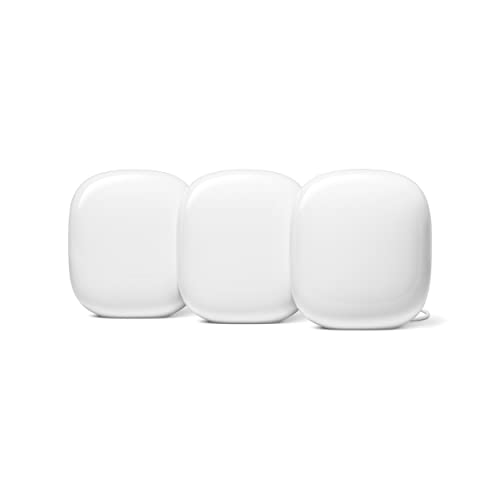
Nest Wifi Pro is Google’s WiFi 6E entry, sold here as a three-pack in the Snow finish. It is managed in the Google Home app alongside other Google smart home gear, and each router includes a Matter controller and Thread border router for homes building around those standards. Google keeps its network features, including Family Wi-Fi parental controls, free of subscription charges.
Specs (per Google):
- WiFi 6E tri-band, with combined speeds rated up to 4.2 Gbps
- Coverage rated up to 2,200 square feet per router and 6,600 square feet for the 3-pack
- Two 1 Gbps Ethernet ports per router
- Rated for up to 100 connected devices per router
- Built-in Matter controller and Thread border router
- Managed through the Google Home app, with automatic software updates
- WPA3 encryption and guest network support
Who it’s for: Google Home households, buyers planning Matter or Thread smart home devices, and anyone who prefers a clean app with no feature subscriptions.
Who should skip: Buyers with internet plans faster than one gigabit, since the ports cap at that speed, and users who want advanced manual network settings beyond what the Google Home app exposes.
NETGEAR Orbi 860 Series RBK863S (3-Pack)

The Orbi 860 kit (model RBK863S-100NAS) is the WiFi 6 outlier here and the hardware heavyweight. There is no 6 GHz band; instead, NETGEAR dedicates a 5 GHz band to backhaul and gives the router a 10 Gig WAN port, the fastest wired connection in this roundup. The kit bundles one year of NETGEAR Armor, after which the security service renews as a subscription, per NETGEAR.
Specs (per NETGEAR):
- WiFi 6 tri-band, AX6000 class, with a dedicated 5 GHz backhaul band
- Combined speeds rated up to 6 Gbps
- Coverage rated up to 8,000 square feet for the 3-pack
- Router: one 10 Gig WAN port and three Gigabit LAN ports; each satellite adds three Gigabit LAN ports
- Rated for up to 100 connected devices
- One year of NETGEAR Armor security included; subscription applies afterward
- Separate guest network and WPA3 support
Who it’s for: Larger homes, buyers with multi-gig internet service, and households that plug in many wired devices at both the router and the satellites.
Who should skip: Buyers who specifically want the 6 GHz band for WiFi 6E or WiFi 7 devices, and budget-focused shoppers, since this kit sits in a premium tier and its security service becomes a paid plan.
ASUS ZenWiFi ET8 (2-Pack)
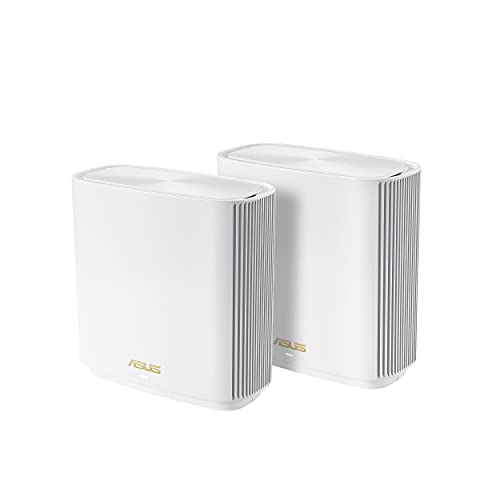
The ZenWiFi ET8 is a two-node WiFi 6E kit in white (model ET8 (W-2-PK)) for homes that do not need three units. ASUS leans into included controls: AiProtection Pro security and parental controls are described by ASUS as free for the life of the product, with no subscription. It is also AiMesh compatible, so it can combine with other AiMesh ASUS routers, and each unit adds a 2.5G port and a USB port for shared storage or a printer.
Specs (per ASUS):
- WiFi 6E tri-band, AXE6600 class
- Rated band speeds: 6 GHz up to 4,804 Mbps, 5 GHz up to 1,201 Mbps, 2.4 GHz up to 574 Mbps
- Coverage rated up to 5,500 square feet for the 2-pack
- Per unit: one 2.5G WAN/LAN port, three Gigabit LAN ports, one USB 3.2 Gen 1 port
- AiProtection Pro network security and parental controls, included without subscription per ASUS
- AiMesh compatible with other ASUS AiMesh routers
- Instant Guard VPN feature and WPA3 support
Who it’s for: Smaller or mid-size homes that need two nodes, buyers who want deep settings and free lifetime security features, and existing ASUS owners expanding an AiMesh setup.
Who should skip: Large homes that need three nodes out of the box, who should compare three-pack kits or plan on a third unit, and buyers who want the simplest possible app-only management.
Comparing the five systems
Coverage ratings climb from the ASUS 2-pack’s maker figure up to the Orbi 860’s, but those numbers come from different test setups, so treat them as rough tiers, not direct measurements. The four WiFi 6E systems open the 6 GHz band to compatible devices, while the Orbi answers with a dedicated 5 GHz backhaul and the only 10 Gig WAN port here. Port counts split the field just as clearly: the Deco XE75 and ZenWiFi ET8 give you three LAN ports per node, the Orbi stacks ports on both router and satellites, and the eero Pro 6E and Nest Wifi Pro keep two per unit. On ongoing costs, Google and ASUS include their stated controls without a plan, while TP-Link, eero, and NETGEAR each gate advanced security features behind subscriptions after any included period. Smart home buyers should note that eero and Google build Thread border routers into every node.
FAQ
How many nodes does my home actually need?
Start from each maker’s coverage rating, then adjust for your layout. Open floor plans sit near the rated figure; homes with brick, concrete, or many small rooms sit well below it. Most households do well with two or three nodes, and every system here can add nodes later, so buying the smaller kit first is a reasonable approach.
Is WiFi 6E worth choosing over WiFi 6?
WiFi 6E adds the 6 GHz band, which only WiFi 6E and WiFi 7 devices can use, and some systems also route node-to-node traffic over it. If your phones and laptops support 6E, the extra band gives them a less crowded lane. If your devices are older, a WiFi 6 system like the Orbi 860 spends its budget on ports and backhaul instead.
Can I use a mesh system with my existing modem and internet service?
Yes. One node connects to your modem or gateway by Ethernet and becomes the router, and the other nodes join wirelessly or by cable. Every maker here states compatibility with standard cable, fiber, and DSL modems. If your provider’s gateway also routes, makers generally suggest bridge mode to avoid double network address translation.
Do any of these systems require a subscription to work?
No. Routing, apps, and core security settings work without payment on all five. Subscriptions enter the picture only for advanced extras: TP-Link’s HomeShield Pro tier, eero Plus, and NETGEAR Armor after its included year, each as the maker discloses. Google and ASUS state that their included controls carry no subscription.
Final verdict
For most homes, the TP-Link Deco XE75 3-pack is the easiest recommendation: WiFi 6E hardware, three nodes, and generous ports at the group’s most approachable tier. Choose the eero Pro 6E for the gentlest setup and smart home extras, or the Nest Wifi Pro if your home already runs on Google Home and Matter. The Orbi 860 earns its premium where multi-gig internet and wired devices dominate, and the ZenWiFi ET8 is the connoisseur’s pick for free, deep controls in a two-node footprint.
Product and ASIN Reference
| Product | ASIN |
|---|---|
| TP-Link Deco XE75 AXE5400 Mesh WiFi 6E System (3-Pack) | B0B88T5RDY |
| Amazon eero Pro 6E Mesh WiFi System (3-Pack) | B091G64GVK |
| Google Nest Wifi Pro WiFi 6E System (3-Pack, Snow) | B0BCQSYPZB |
| NETGEAR Orbi 860 Series Mesh WiFi 6 System RBK863S (3-Pack) | B0BF7PV6PK |
| ASUS ZenWiFi ET8 Mesh WiFi 6E System (2-Pack) | B0979Q7F69 |