Key takeaways
- Compare 5 mini photo printers for pocket-sized prints. ZINK and dye-sub picks with app printing, compact bodies, and sticky-back photo paper.
Disclosure: As an Amazon Associate, we earn from qualifying purchases.
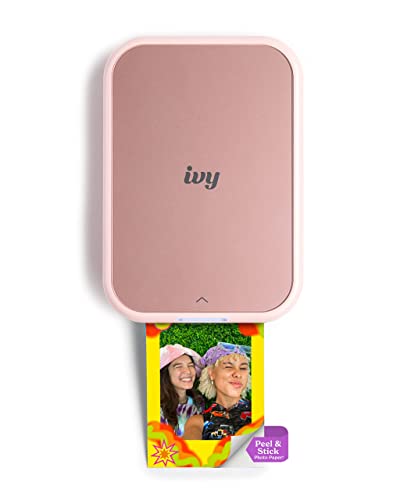

A mini photo printer turns the pictures on your phone into small prints you can hold, stick in a journal, or hand to a friend before the moment fades. The best ones fit in a jacket pocket, connect to your phone over Bluetooth, and print a 2 x 3 inch photo in about a minute. They are not desk printers shrunk down. They are a different kind of device, built around one job: quick, small, phone-to-paper prints anywhere.
This guide covers five pocket photo printers still selling on Amazon US. Every pick prints from a phone app, fits in a pocket or small bag, and uses either ZINK zero-ink paper or dye-sublimation cartridges. No full-size photo printer, no office inkjet, and no label printer appears here. If you want a printer for documents or large prints, this is the wrong guide. If you want wallet-sized prints from your phone at a party, on a trip, or at home, these five cover the real choices.
Quick Picks
Our Short List of 3
- Best for: Everyday pocket printing, travel, parties, and anyone who wants a slim ZINK printer with fast USB-C charging.
- Print technology: ZINK (Zero Ink)
- Print size: 2 x 3 in, borderless, peel-and-stick back
- Print resolution: 313 x 512 dpi
- Connectivity: Bluetooth, Canon Mini Print app for iOS and Android
- Best for: Simple sticker prints, gifts, journals, and first-time mini printer buyers who want the easiest setup.
- Print technology: ZINK (Zero Ink)
- Print size: 2 x 3 in, sticky-back
- Print resolution: 313 x 400 dpi
- Connectivity: Bluetooth, HP Sprocket app for iOS and Android

- Best for: Instant-film fans, parties, and anyone who wants the longest battery life and the classic bordered instant look.
- Print technology: 3-color exposure with OLED on Instax Mini instant film
- Print size: 86 x 54 mm sheet, 62 x 46 mm image (2.4 x 1.8 in)
- Print resolution: 318 dpi
- Connectivity: Bluetooth 4.2, Instax Mini Link app for iOS and Android
All 5 Picks at a Glance
| Product | Specs | Action |
|---|---|---|
| 1. Canon Ivy 2 Mini Photo Printer |
| Check price on Amazon |
| 2. HP Sprocket 2×3 Portable Photo Printer |
| Check price on Amazon |
| 3. Fujifilm Instax Mini Link 2 Smartphone Printer |
| Check price on Amazon |
 4. Kodak Mini 2 Retro 4PASS Portable Photo Printer |
| Check price on Amazon |
 5. Polaroid Hi-Print 2nd Generation Pocket Photo Printer |
| Check price on Amazon |
How to Choose a Mini Photo Printer
Print technology: ZINK vs dye-sub vs instant film. ZINK printers heat dye crystals already inside the paper, so there is no ink and no cartridge to buy beyond the paper itself. Prints come out dry and ready to stick, and the paper is cheap to carry in a stack. Dye-sub printers pass the sheet through four times, laying down yellow, magenta, and cyan dye plus a protective coating. The result is smoother color and a tougher finish that resists fingerprints and water. Instant-film printers, like the Fujifilm pick below, expose real instant film with light. The prints develop in front of you and carry the classic white-bordered look, but the film costs more per sheet and you wait about 90 seconds for the image to appear.
Print size. Nearly every mini printer makes a 2 x 3 inch print, about the size of a credit card. That is the whole point of the category. A few make slightly larger or smaller images, and the Fujifilm print has a white border around a 2.4 x 1.8 inch image. Decide whether you want borderless sticker prints for journals and scrapbooks, or bordered instant-film prints for pinning up.
App connectivity. Every printer here connects to your phone over Bluetooth through its own free app. Check that the app supports your phone before you buy, and look at what the app lets you do: crop and rotate, add frames and text, print collages, and print several small photos on one sheet. Some apps also let you print from social media albums.
Paper and ink cost. A mini printer is only as cheap to run as its consumables. ZINK paper comes in packs of 20 or 50 sheets, and the cost per sheet falls when you buy larger packs. Dye-sub printers use all-in-one cartridges that combine paper and dye ribbon, so you buy cartridges in packs of 20, 30, or 40 sheets and never buy ink separately. Instant film comes in packs of 10 sheets, and it is the most expensive per print of the three technologies. Work out how many prints you will make in a month, then compare the cost of a pack of paper or cartridges against that number.
Battery and charging. Most mini printers run on a built-in rechargeable battery and charge over USB. Battery life varies widely: the Fujifilm pick manages about 100 prints per charge, while most ZINK and dye-sub models manage about 20. If you print at events or on trips, a longer battery life matters more than a slightly smaller body. Check whether the printer charges over USB-C or an older micro USB cable, and whether a charging cable comes in the box.
Size and weight. A true mini printer should slide into a jacket pocket or a small bag pouch. Anything heavier than about 9 ounces or thicker than about an inch is a bag printer, not a pocket printer. The lightest picks here weigh about 5 to 6 ounces. If you plan to carry the printer all day at a festival or on a walk, every ounce counts.
The 5 Best Mini Photo Printers
1. Canon Ivy 2 Mini Photo Printer
- Best for: Everyday pocket printing, travel, parties, and anyone who wants a slim ZINK printer with fast USB-C charging.
- Print technology: ZINK (Zero Ink)
- Print size: 2 x 3 in, borderless, peel-and-stick back
- Print resolution: 313 x 512 dpi
- Connectivity: Bluetooth, Canon Mini Print app for iOS and Android
Everyday pocket printing, travel, parties, and anyone who wants a slim ZINK printer with fast USB-C charging.
The 10-sheet paper tray means you reload often during a long printing session. Keep a spare pack of ZINK paper in your bag if you print for a group.
The Canon Ivy 2 is the most rounded mini printer in this guide. It uses ZINK paper, prints borderless 2 x 3 inch photos with a peel-and-stick back, and connects to the Canon Mini Print app over Bluetooth. The body is one of the slimmest here, and the LED light bar on the front shows charging and print status at a glance. Canon lists a full charge in as little as 45 minutes over USB-C, and the battery manages about 20 prints per charge.
Watch out for: The 10-sheet paper tray means you reload often during a long printing session. Keep a spare pack of ZINK paper in your bag if you print for a group.
2. HP Sprocket 2×3 Portable Photo Printer
- Best for: Simple sticker prints, gifts, journals, and first-time mini printer buyers who want the easiest setup.
- Print technology: ZINK (Zero Ink)
- Print size: 2 x 3 in, sticky-back
- Print resolution: 313 x 400 dpi
- Connectivity: Bluetooth, HP Sprocket app for iOS and Android
Simple sticker prints, gifts, journals, and first-time mini printer buyers who want the easiest setup.
ZINK prints look softer than dye-sub prints, with less fine detail in faces and landscapes. If print sharpness matters most to you, look at the dye-sub picks below.
The HP Sprocket is the simplest printer in this guide, and that is its appeal. Load a 10-sheet pack of ZINK paper, pair the printer with the HP Sprocket app, and print 2 x 3 inch sticky-back photos from your phone. There is no film to load, no cartridge to swap, and no ink to buy. The Luna Pearl bundle in this listing includes a paper pack so you can print as soon as the printer is charged.
Watch out for: ZINK prints look softer than dye-sub prints, with less fine detail in faces and landscapes. If print sharpness matters most to you, look at the dye-sub picks below.
3. Fujifilm Instax Mini Link 2 Smartphone Printer
- Best for: Instant-film fans, parties, and anyone who wants the longest battery life and the classic bordered instant look.
- Print technology: 3-color exposure with OLED on Instax Mini instant film
- Print size: 86 x 54 mm sheet, 62 x 46 mm image (2.4 x 1.8 in)
- Print resolution: 318 dpi
- Connectivity: Bluetooth 4.2, Instax Mini Link app for iOS and Android
Instant-film fans, parties, and anyone who wants the longest battery life and the classic bordered instant look.
Film is sold separately, so the printer cannot print anything until you buy film, and film costs more per sheet than ZINK paper. The printer also charges over micro USB rather than USB-C, so it needs its own cable.
The Fujifilm Instax Mini Link 2 is the only instant-film printer in this guide, and it prints the most distinctive photos here. Instead of heating paper or laying down dye, it exposes real Instax Mini film with light, and the image develops in about 90 seconds. The white border and soft instant-film look are the whole point. Battery life is the best in this guide by a wide margin, at about 100 prints per charge, and the printer talks to the Instax Mini Link app over Bluetooth.
Watch out for: Film is sold separately, so the printer cannot print anything until you buy film, and film costs more per sheet than ZINK paper. The printer also charges over micro USB rather than USB-C, so it needs its own cable.
4. Kodak Mini 2 Retro 4PASS Portable Photo Printer
- Best for: Durable laminated prints, scrapbooks, and anyone who wants dye-sub quality with paper included in the box.
- Print technology: Dye-sublimation, 4PASS
- Print size: 2.1 x 3.4 in
- Print resolution: 291 x 300 dpi
- Connectivity: Bluetooth, Kodak app for iOS and Android
Durable laminated prints, scrapbooks, and anyone who wants dye-sub quality with paper included in the box.
This is the heaviest printer in this guide at about 8.6 ounces, so it suits a bag more than a tight pocket. Kodak also lists this model as discontinued by the maker, so confirm the listing is in stock before you order and spot-check the link at checkout.
The Kodak Mini 2 Retro uses 4PASS dye-sublimation, which passes each sheet through the printer four times to lay down yellow, magenta, and cyan dye plus a protective laminate. The prints resist fingerprints and water, and the color looks smoother than ZINK. The all-in-one cartridge combines paper and dye ribbon, so there is nothing else to load. This listing is a bundle with 38 sheets: an 8-sheet cartridge in the printer plus a 30-sheet pack.
Watch out for: This is the heaviest printer in this guide at about 8.6 ounces, so it suits a bag more than a tight pocket. Kodak also lists this model as discontinued by the maker, so confirm the listing is in stock before you order and spot-check the link at checkout.
5. Polaroid Hi-Print 2nd Generation Pocket Photo Printer
- Best for: Smooth dye-sub color in a slim pocket body, and anyone who likes the Polaroid look and the peel-and-stick format.
- Print technology: Dye diffusion thermal transfer, 4PASS dye-sublimation
- Print size: 54 x 86 mm (2.1 x 3.4 in), sticky-back
- Print resolution: 291 dpi
- Connectivity: Bluetooth, Hi-Print app for iOS and Android
Smooth dye-sub color in a slim pocket body, and anyone who likes the Polaroid look and the peel-and-stick format.
This listing is the printer only. It does not include a paper cartridge or a USB-C cable, so buy both before your first printing session. Real-world battery life also runs shorter than the listed figure when you print many photos in a row, so top up the charge before an event.
The Polaroid Hi-Print 2nd Generation is the slimmest dye-sub printer in this guide. It uses four-pass dye diffusion thermal transfer to print 2.1 x 3.4 inch sticky-back photos with smooth color and a laminated finish. The second generation adds USB-C charging and a casing made partly from recycled materials, and it pairs with the Hi-Print app over Bluetooth.
Watch out for: This listing is the printer only. It does not include a paper cartridge or a USB-C cable, so buy both before your first printing session. Real-world battery life also runs shorter than the listed figure when you print many photos in a row, so top up the charge before an event.
Which One Fits
Pick the Canon Ivy 2 if you want the most balanced mini printer: slim body, fast USB-C charging, ZINK simplicity, and paper in the box. Pick the HP Sprocket if you want the easiest setup and the lowest fuss, and you are happy with softer ZINK prints. Pick the Fujifilm Instax Mini Link 2 if you love the instant-film look and want a battery that lasts about 100 prints, and you accept that film costs more per sheet. Pick the Kodak Mini 2 Retro if you want tough laminated dye-sub prints and a bundle that includes 38 sheets. Pick the Polaroid Hi-Print 2nd Generation if you want dye-sub quality in the slimmest body here, and you do not mind buying paper and a cable separately.
If you print a few photos a week at home, any ZINK pick will do. If you print at parties and events, battery life and paper capacity matter more than size, so the Fujifilm or the Kodak bundle makes more sense.
Common Mistakes
Buying the printer and forgetting the paper. Three of the five picks here need consumables bought separately or soon after: the Fujifilm needs film, the Polaroid needs cartridges and a cable, and the ZINK printers need more paper after the first 10 sheets. Order paper with the printer so your first printing session is not a trip back to the store.
Expecting large prints. A mini printer makes credit-card-sized prints. That is the format. If you want 4 x 6 inch prints for frames, a mini printer will disappoint you, and no app setting changes the paper size. Match the printer to the print size you actually want.
Ignoring the app. The app is half the product. A printer with a weak app means clumsy cropping, no collage layouts, and failed Bluetooth pairing. Check that the app supports your phone and that it offers the editing tools you want before you buy.
Printing a full tray in one go. Mini printers heat up during long runs, and battery life drops when you print sheet after sheet without a break. Print in small batches, let the printer cool between groups of photos, and keep the battery topped up before an event.
Storing prints in sunlight. ZINK and dye-sub prints fade faster in direct sun and heat, and instant film develops best away from bright light. Keep finished prints in a journal, album, or box rather than on a sunny windowsill.
FAQ
Do mini photo printers need ink?
No. ZINK printers use paper with dye crystals already inside it, so there is no ink to buy. Dye-sub printers use all-in-one cartridges that combine paper and dye ribbon. Instant-film printers use film packs. In every case, the consumable is the paper, cartridge, or film, not a separate ink cartridge.
How long does a mini photo printer battery last?
It depends on the model. Most ZINK and dye-sub mini printers manage about 20 prints per charge, while the Fujifilm Instax Mini Link 2 manages about 100 prints per charge. Battery life falls when you print many photos in a row, so charge the printer fully before an event and carry a power bank for long days.
Can I print from any phone?
All five printers here connect over Bluetooth to a free app for iOS and Android. Check the app listing for your phone model before you buy, and keep your phone near the printer while a job runs, since Bluetooth range is short.
Are mini photo prints waterproof?
Dye-sub prints carry a protective laminate that resists fingerprints and water, and ZINK prints are smudge-free and water-resistant. Instant-film prints are best kept dry while they develop. No mini print is fully waterproof, so keep prints out of rain and away from standing water.